Network Administrator Roadmap (2026): Cisco CCNA to Enterprise Cloud Guide
Master computer networking fundamentals, Cisco IOS configuration, VLAN segmentation, dynamic routing (OSPF, BGP), enterprise firewall security, and Python network automation.

What's in this guide
The Short Answer: Networking in 2026
Every cloud application, data center, and distributed system relies on physical and virtual networks. In 2026, network administration has evolved from purely manual command-line device configuration into software-defined networking (SD-WAN) and automated Infrastructure-as-Code.
Whether configuring physical Cisco enterprise hardware, troubleshooting multi-gigabit campus Wi-Fi, or architecting virtual private clouds (VPCs) in AWS and Azure, a deep grasp of packet switching, routing protocols, and subnetting is indispensable.
Master packet mechanics before automation. Understand how Ethernet frames and IP packets traverse switches and routers before automating with Python and Ansible.
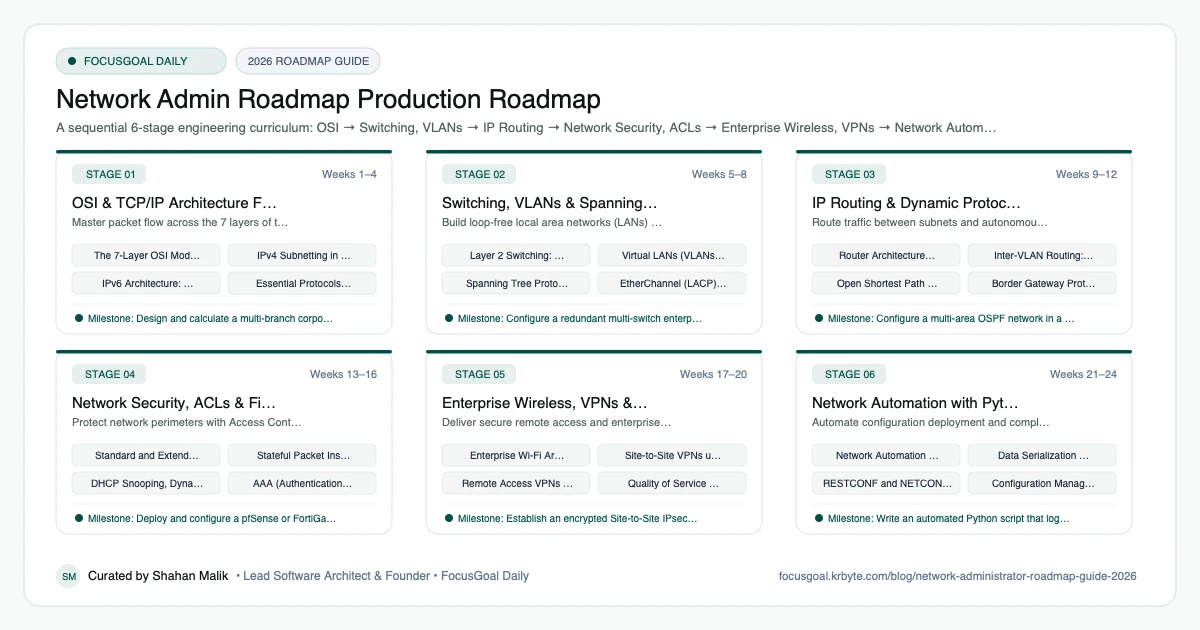
The 6 Production Stages
Follow these structured, sequential stages to systematically build production competence:
OSI & TCP/IP Architecture Fundamentals
Master packet flow across the 7 layers of the OSI model, binary IPv4 subnetting, and IPv6 address allocation.
Switching, VLANs & Spanning Tree (STP)
Build loop-free local area networks (LANs) using managed switches, 802.1Q trunks, and Spanning Tree Protocol.
IP Routing & Dynamic Protocols (OSPF & BGP)
Route traffic between subnets and autonomous systems using static routes, inter-VLAN routing, and OSPF.
Network Security, ACLs & Firewalls
Protect network perimeters with Access Control Lists (ACLs), stateful firewalls, and zone-based security policies.
Enterprise Wireless, VPNs & SD-WAN
Deliver secure remote access and enterprise wireless networks with IPsec tunnels and Software-Defined WAN.
Network Automation with Python & Ansible
Automate configuration deployment and compliance monitoring across hundreds of network devices.
Is Network Administration Worth It in 2026?
Yes, if you like infrastructure and troubleshooting. Every office, data center, and cloud environment depends on networks, and cloud adoption has changed the work rather than removed it. Today's network roles often mix switching, routing, wireless, firewalls, and cloud networking.
The honest caveat is that traditional on-premises roles are shifting, so adding automation and cloud skills makes you more adaptable. Pay and demand differ by region and employer, so check current local job listings instead of assuming a number.
- Good fit if you enjoy methodical troubleshooting.
- Strong stepping stone toward security, cloud, or DevOps.
- Learning curve: concepts are cumulative, so do not skip the basics.
Network Admin vs Sysadmin vs Cybersecurity: Which to Learn First
Networking is a foundation for the neighbors. A system administrator focuses on servers and operating systems, a security analyst on detection and defense, and a network administrator on connectivity and performance. Knowing networks makes you better at the other two.
If you are new to IT, start here before moving to the Cybersecurity Engineer roadmap or the Cloud Computing roadmap, where virtual networks and firewalls reappear.
- Network admin: switches, routers, VLANs, wireless, VPNs.
- Sysadmin: servers, identity, patching, backups.
- Security: monitoring, hardening, incident response.
Network Administration Setup: Tools You Need
You can practice without owning enterprise gear. Network simulators such as Cisco Packet Tracer, GNS3, or EVE-NG let you build topologies on a laptop. Pair them with Wireshark for packet analysis and a Linux machine for tools like ping, traceroute, dig, and tcpdump.
If you want hardware, an inexpensive managed switch and a spare router give you real console experience. Learn to read configuration, take backups, and document changes, because discipline matters as much as commands.
- Packet Tracer, GNS3, or EVE-NG for labs.
- Wireshark and tcpdump for traffic inspection.
- dig, traceroute, and ping for diagnostics.
- A diagramming tool for topology documentation.
Networking Portfolio Projects & How to Get a Job
Document labs as if they were real deployments: a topology diagram, an addressing plan, configuration snippets, and a test plan. Show that you can segment a network, secure it, and troubleshoot a deliberate fault.
Many people enter through help desk or junior network technician roles, so highlight troubleshooting experience on your resume. In interviews expect questions such as what happens when you type a URL into a browser, so rehearse a clear layered answer.
- Design a small-office network with VLANs and inter-VLAN routing.
- Configure site-to-site VPN in a simulator.
- Build a DHCP, DNS, and firewall lab and document it.
- Write a troubleshooting guide for common outage scenarios.
Beginner Pitfalls vs Production Reality
Self-taught developers commonly waste months making avoidable structural mistakes. Here is how production engineers approach these challenges:
Master Network Engineering with FocusGoal Daily
Network administration requires mastering precise protocol standards, subnet calculations, and device configurations. FocusGoal Daily turns this curriculum into manageable daily learning steps.
- Curated curriculum aligned with Cisco CCNA (200-301) and enterprise cloud networking.
- 100% offline study support powered by local SQLite database on Android.
- In-app Ask AI tutor for immediate explanations of OSPF states, subnet masks, and STP.
- Daily streak tracking to ensure structured, consistent exam and career preparation.
Track this roadmap,
one topic at a time.
Download FocusGoal, pick this roadmap and finish your first daily topic in minutes.
Frequently Asked Questions
Is Cisco CCNA still worth it in 2026?
Yes. The Cisco CCNA remains the most widely recognized and respected foundational credential for network administrators, systems engineers, and cloud network architects.
Do network administrators need to learn Python?
Yes. Network automation has become a core job requirement. Engineers who can automate configuration backups, compliance audits, and provisioning with Python earn significantly higher salaries.
What software should I use to practice networking without expensive hardware?
Cisco Packet Tracer is great for beginners. For advanced CCNA and CCNP routing, GNS3 and EVE-NG run real Cisco IOS and Linux firewall images inside virtual machines.
Is network administration a good career in 2026?
Yes for people who like troubleshooting infrastructure, and it is a strong base for cloud and security roles. Adding automation and cloud networking skills improves long-term options.
Do I need a CCNA to become a network administrator?
It is not strictly required everywhere, but it is widely recognized and gives a structured curriculum. Hands-on labs and a clear understanding of fundamentals matter just as much.
Network administrator or system administrator: which should I choose?
Choose networking if you enjoy connectivity, routing, and traffic, and system administration if you prefer servers and operating systems. Many employers value people who understand both.
Can I learn networking at home without equipment?
Yes. Simulators like Packet Tracer and GNS3 let you practice routing, switching, and VLANs on a laptop.
Is networking still relevant with the cloud?
Yes, because cloud environments are built on virtual networks, routing, and firewalls. The skills transfer directly.
How does FocusGoal Daily help network engineering students?
FocusGoal Daily organizes the vast CCNA syllabus into manageable daily learning checklists with offline streak tracking on Android.
Start Your Network Admin Roadmap Today
Follow structured daily goals, study 100% offline with local SQLite, and get on-demand AI guidance with FocusGoal Daily on Android.
Get FocusGoal Daily Free on Google Play