iOS Developer Roadmap (2026): Swift 6 & Modern SwiftUI Guide
Master Swift 6 compile-time concurrency, declarative SwiftUI design systems, SwiftData local persistence, Observation framework, and App Store submission.

What's in this guide
The Short Answer: iOS Engineering in 2026
iOS engineering has reached a major milestone with Swift 6 and modern SwiftUI. Swift 6 enforces compile-time data race safety by default, transforming how iOS developers manage background tasks, actors, and multi-threaded systems.
UIKit is now largely a legacy concern for maintenance codebases. Professional iOS developers in 2026 leverage SwiftUI, the Observation framework (@Observable), SwiftData, and async/await to build fluid, battery-efficient applications across iOS, iPadOS, and macOS.
Starting from zero? Read how to become an iOS developer step by step, or compare options in the mobile app developer roadmap.
Embrace Swift 6 strict concurrency and declarative SwiftUI. Master actors, task groups, and SwiftData to build fluid, high-frame-rate Apple apps that never drop frames.
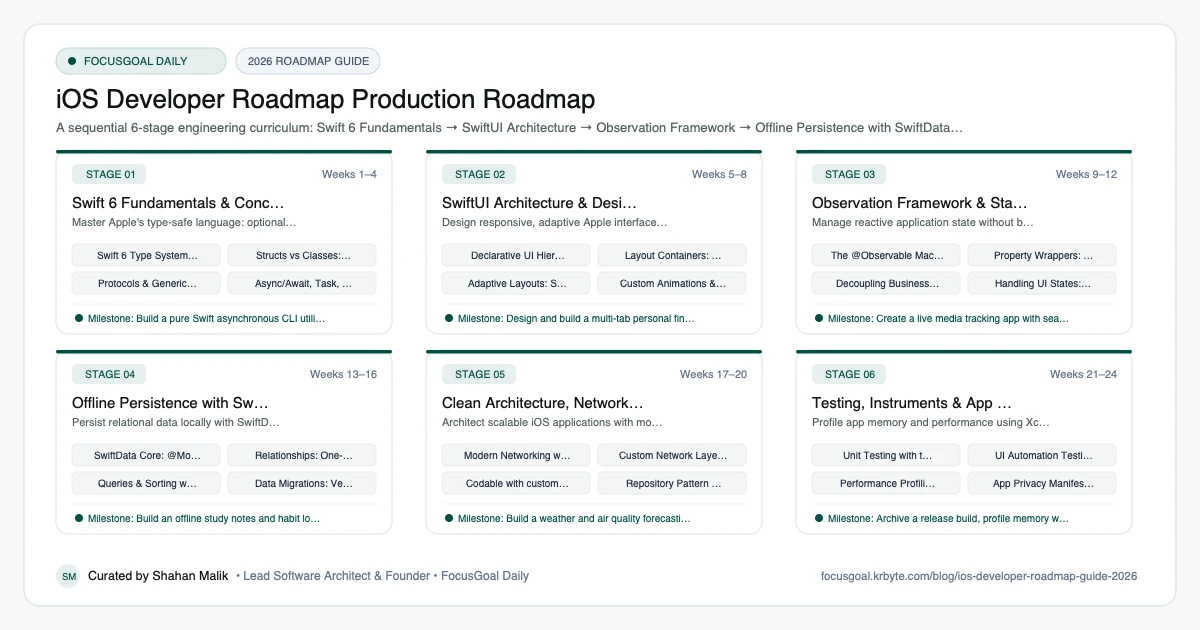
The 6 Production Stages
Follow these structured, sequential stages to systematically build production competence:
Swift 6 Fundamentals & Concurrency
Master Apple's type-safe language: optionals, protocols, generics, and Swift 6 compile-time concurrency safety.
SwiftUI Architecture & Design Systems
Design responsive, adaptive Apple interfaces using declarative SwiftUI and Apple Human Interface Guidelines.
Observation Framework & State Flow
Manage reactive application state without boilerplate using Swift's native Observation framework.
Offline Persistence with SwiftData
Persist relational data locally with SwiftData, Apple's modern declarative replacement for Core Data.
Clean Architecture, Networking & URLSession
Architect scalable iOS applications with modular networking, type-safe endpoints, and offline fallbacks.
Testing, Instruments & App Store Release
Profile app memory and performance using Xcode Instruments, write automated tests, and launch to TestFlight and the App Store.
Is iOS Development Worth It in 2026?
iOS development is a focused, well-documented path: one company defines the language, the UI framework, and the distribution channel. That consistency makes learning more structured than many cross-platform ecosystems, and Swift and SwiftUI are Apple's current recommended tools for new apps.
The caveats are real. You need a Mac, the platform evolves quickly, and App Store review adds process that web developers may not expect. Demand and pay depend heavily on your location and industry, so check current local job listings and official sources instead of relying on generalisations.
- Best fit: people who enjoy polished UI and Apple hardware.
- Requires macOS for Xcode and the simulator.
- Yearly OS releases mean ongoing learning.
iOS vs Android vs Cross-Platform: Which to Learn First?
Native iOS gives you the deepest access to Apple features and the newest APIs as soon as they ship. Native Android does the same for Google's platform, and cross-platform frameworks trade some of that depth for a shared codebase.
If you want the Android side, follow the Android developer roadmap. If you want one codebase for both, compare the Flutter developer roadmap and the React Native developer roadmap. Many developers learn one native platform deeply first, because the concepts of lifecycle, state, and persistence carry over.
iOS Developer Setup: Tools You Need
The core requirement is a Mac running a recent macOS with the current version of Xcode, which is free from the Mac App Store. Xcode bundles the compiler, simulators, Instruments profiler, and Interface Previews you will use daily.
A physical iPhone is helpful for testing performance, haptics, and the camera, though the simulator covers most early learning. Add Git early, and learn Swift Package Manager for dependencies.
- Mac with enough free storage for Xcode and simulators.
- Xcode, including the Simulator and Instruments.
- A free Apple ID to run on your own device.
- Git and a GitHub account for your portfolio.
- Apple Developer Program membership when ready to distribute.
Portfolio Projects & How to Get an iOS Developer Job
A strong portfolio shows complete apps, not tutorial copies. Aim for a few projects with clear architecture, persistence, networking, accessibility support, and tests, each with screenshots and a short write-up on the trade-offs you made.
In interviews expect questions on Swift fundamentals, memory management, concurrency, and how you structure SwiftUI state. Be ready to walk through one app end to end, including a bug you fixed using Instruments or the debugger.
- Habit or budget tracker using SwiftData.
- API-driven app such as a recipe or movie browser with search and caching.
- Widget or notification-based utility app.
- Accessible app supporting Dynamic Type and VoiceOver.
- One app published through TestFlight or the App Store.
Beginner Pitfalls vs Production Reality
Self-taught developers commonly waste months making avoidable structural mistakes. Here is how production engineers approach these challenges:
Build iOS Engineering Discipline with FocusGoal Daily
Mastering Apple's ecosystem requires structured daily dedication. FocusGoal Daily breaks the entire iOS engineering roadmap into clear, achievable daily milestones.
- Curated curriculum from Swift 6 basics to SwiftUI, SwiftData, and App Store submission.
- 100% offline study support powered by local SQLite database on Android.
- In-context Ask AI tutor for immediate answers on actors, ARC, and SwiftUI view life cycles.
- Streak tracking to help you stay committed every day until your first iOS app ships.
Track this roadmap,
one topic at a time.
Download FocusGoal, pick this roadmap and finish your first daily topic in minutes.
Frequently Asked Questions
Do I need a Mac to learn iOS development?
Yes. Xcode and the iOS Simulator only run on macOS. An entry-level Apple Silicon Mac (M1/M2/M3 Mac mini or MacBook Air) with 16GB RAM is ideal for modern development.
Is UIKit still required in 2026?
SwiftUI is the primary framework for all new iOS apps. However, understanding UIViewRepresentable allows you to integrate UIKit views when specialized low-level APIs require it.
What makes Swift 6 different from earlier Swift versions?
Swift 6 introduces strict compile-time data race safety, eliminating data races at compile time rather than relying on runtime debugging.
How do I become an iOS developer from scratch?
Learn Swift basics, then build small SwiftUI apps in Xcode and gradually add networking, persistence, and testing. Publish a finished app to TestFlight or the App Store to prove you can complete the full cycle.
Is iOS development still worth learning in 2026?
Yes, if you want to build apps for Apple platforms, since Swift and SwiftUI are Apple's main tools for them. Demand differs by region, so check current local job listings before committing.
iOS vs Android development: which should I learn first?
Choose the platform you own devices for and want to target. iOS requires a Mac, while Android development works on more operating systems; the concepts transfer well between them.
Do I need a paid Apple Developer account to learn iOS?
No, you can build and run apps in the simulator and on your own device with a free Apple ID. A paid Apple Developer Program membership is required to distribute through TestFlight and the App Store.
How long does it take to become an iOS developer?
It varies with your prior programming experience and weekly study time. Many learners need several months of steady practice to build a portfolio-ready app, and longer to be job-ready.
How does FocusGoal Daily help iOS developers?
FocusGoal Daily turns the expansive Apple developer documentation into actionable daily learning checklists with offline streak tracking on Android.
Start Your iOS Developer Roadmap Today
Follow structured daily goals, study 100% offline with local SQLite, and get on-demand AI guidance with FocusGoal Daily on Android.
Get FocusGoal Daily Free on Google Play