Android Developer Roadmap (2026): Modern Kotlin & Jetpack Compose Guide
Learn modern native Android engineering using Kotlin 2.0, declarative Jetpack Compose UI, Coroutines, Flow, Room SQLite persistence, and Clean Architecture for the Google Play Store.

What's in this guide
The Short Answer: Native Android in 2026
Native Android development in 2026 has completely transitioned away from legacy XML layouts and Fragment lifecycles. With Kotlin 2.0 and declarative Jetpack Compose now standard, building high-performance Android applications is cleaner and more reactive than ever.
However, native Android engineering requires true architectural depth. Understanding the Android OS execution model—Activity lifecycles, configuration changes, process death, background work, and battery optimization—is what separates hobbyist developers from professional engineers. If you are also comparing native options with cross-platform alternatives, explore our Flutter Developer Roadmap, iOS Developer Roadmap, and React Native Developer Roadmap.
New to this? Start with how to become an Android developer step by step, compare Kotlin vs Java for Android, check the Android developer job market and future, or see the junior to senior Android developer roadmap.
Build native apps that respect the operating system. Master Jetpack Compose, asynchronous Kotlin Coroutines, and local Room SQLite caching to deliver instant, battery-friendly mobile experiences.
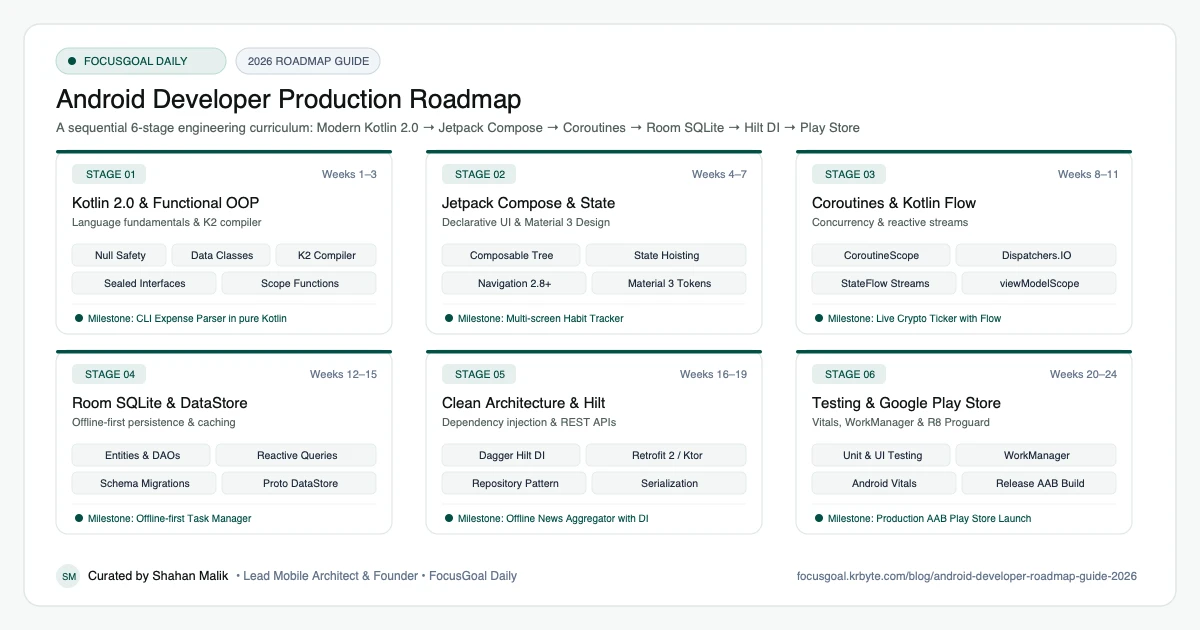
The 6 Production Stages
Follow these structured, sequential stages to systematically build production competence:
Modern Kotlin 2.0 & Functional OOP
Master Kotlin 2.0 as a primary language: null safety, data classes, extension functions, sealed interfaces, and lambda expressions.
Jetpack Compose & State Management
Build modern, declarative UI layouts. Understand recomposition, state hoisting, remember/rememberSaveable, and Material 3 design systems.
Coroutines, Structured Concurrency & Flow
Handle asynchronous tasks without blocking the main UI thread. Master CoroutineScopes, Dispatchers, and reactive Kotlin Flows.
Local Persistence with Room & DataStore
Architect offline-first applications using Google's Room SQLite database abstraction and Preferences DataStore for user preferences.
Architecture, DI with Hilt & REST APIs
Implement Google's recommended Modern Android Architecture (MVI / MVVM) with Hilt dependency injection and Retrofit / Ktor networking. For server integration, see our Node.js Roadmap and Java Backend Roadmap.
Testing, Performance & Play Store Launch
Write unit and Compose UI tests, profile memory with Android Studio, and package a secure Android App Bundle for Google Play release.
Is Android Development Worth It in 2026?
Yes, if you want a clear path into a large market. Android is the most widely used mobile operating system worldwide, which means steady demand for developers at startups, agencies, product companies, and in-house teams. Modern Android work also overlaps with skills that transfer well: Kotlin is used on the server and in multiplatform projects, and declarative UI with Jetpack Compose is similar to how React and SwiftUI work.
The honest caveat is that entry-level competition is high. Candidates who only completed tutorials struggle; candidates with two or three published, well-architected apps stand out. This roadmap is built around that: every stage ends with a milestone you can put in a portfolio.
- Strong fit if you enjoy building visible, user-facing products.
- Learning curve: Kotlin and Compose are beginner-friendly, but Android lifecycle and architecture take real practice.
- Salary and demand vary a lot by country and seniority, so check current local job listings before planning around a number.
Android vs iOS vs Flutter: Which to Learn First
Choose native Android (Kotlin + Jetpack Compose) if your target users or employers are Android-first, if you want the deepest access to platform features, or if you want a free-to-start toolchain that runs on Windows, macOS, and Linux. Choose iOS if you want to work in the Apple ecosystem and own a Mac. Choose Flutter or React Native if you need one codebase for both platforms and are comfortable giving up some platform depth.
You do not have to decide forever. Concepts such as state management, navigation, async programming, and offline storage carry across all of them. Compare the paths in our iOS Developer Roadmap, Flutter Developer Roadmap, and React Native Developer Roadmap.
Android Developer Setup: Tools You Need
You can start on a modest laptop. Install the following and you have everything needed for Stage 1 onward:
- Android Studio: the official IDE, bundling the Android SDK, emulator, and profiler.
- A recent JDK is bundled with Android Studio, so you normally do not need to install one separately.
- An Android Virtual Device (emulator) or a physical phone with Developer options and USB debugging enabled.
- Git and a GitHub account to publish your projects.
- A Google Play Console developer account (one-time registration fee) when you are ready to publish.
Portfolio Projects & How to Get an Android Developer Job
Hiring managers look for evidence that you can ship. Use the milestones from the six stages as your portfolio: an expense tracker, a habit dashboard, a news reader with offline caching, and finally one app published on Google Play with a public README and architecture diagram.
When applying, put your Play Store link and GitHub at the top of your resume, describe your architecture choices (MVVM, Hilt, Room, Flow), and be ready to explain lifecycle, state hoisting, and coroutine cancellation in interviews. Contributing a small fix to an open-source Android project is a strong extra signal.
- Publish at least one app to Google Play and link it on your resume.
- Write a short README with screenshots and a one-paragraph architecture summary for each project.
- Practice explaining the Activity lifecycle, process death, and recomposition out loud.
- Apply to junior, intern, and contract roles, and also to QA or support-engineering roles at Android-first companies as a way in.
Beginner Pitfalls vs Production Reality
Self-taught developers commonly waste months making avoidable structural mistakes. Here is how production engineers approach these challenges:
Master Android Engineering with FocusGoal Daily
FocusGoal Daily itself is an offline-first Android application built with clean architecture. Experience firsthand the habits and engineering patterns required to build elite mobile software.
- Structured Android curriculum matching Google's latest modern guidance.
- 100% offline study support powered by local SQLite database on Android.
- On-demand AI explanations for Coroutines, Flow, and Compose concepts.
- Daily streak tracking to maintain coding momentum every day.
Track this roadmap,
one topic at a time.
Download FocusGoal, pick this roadmap and finish your first daily topic in minutes.
Frequently Asked Questions
Do I need to learn XML layouts in 2026?
Jetpack Compose is the default standard for all modern Android development. While you may encounter legacy XML in older codebases, all new greenfield applications are built 100% with Compose.
What is the difference between Kotlin Coroutines and RxJava?
Coroutines provide language-level structured concurrency with simple sequential syntax (suspend functions), whereas RxJava relies on complex operator chains. In 2026, Coroutines & Flow have completely superseded RxJava.
How long does it take to learn native Android development?
With focused daily practice of 1.5–2 hours following this roadmap, most engineers become junior-to-mid ready within 5 to 6 months.
How do I become an Android developer from scratch?
Start with Kotlin basics, then learn Jetpack Compose, coroutines and Flow, Room for local storage, and architecture with Hilt. Build one small app per stage, and publish the last one on Google Play. The six stages above lay out this order with realistic timelines.
Is Android development still worth learning in 2026?
Yes. Android remains the largest mobile platform, and the modern stack (Kotlin, Compose, Flow) is cleaner than the old XML and Fragment approach. Entry-level competition is real, so a portfolio of published apps matters more than certificates.
Should I learn Kotlin or Java for Android?
Learn Kotlin. It is Google's recommended language for Android, and all current official samples and Jetpack libraries target it first. Java is still useful for reading older codebases.
Do I need a certification to get an Android developer job?
No certification is required. Employers mostly look at your projects, your GitHub, and how well you can explain architecture and lifecycle decisions. A shipped app is your best proof.
How does FocusGoal Daily help Android developers?
FocusGoal Daily organizes the extensive Android developer documentation into bite-sized daily micro-goals, tracks your study streaks, and tests your retention offline on your Android device.
Start Your Android Developer Roadmap Today
Follow structured daily goals, study 100% offline with local SQLite, and get on-demand AI guidance with FocusGoal Daily on Android.
Get FocusGoal Daily Free on Google Play