Flutter Developer Roadmap (2026): The Complete Step-by-Step Guide
Master Dart 3, widget trees, scalable state management, offline-first SQLite persistence, and Google Play Store publishing without getting trapped in endless video tutorials.

What's in this guide
The Short Answer: Why Flutter in 2026?
Mobile development moves fast, but Flutter has matured into Google's flagship cross-platform standard. In 2026, the framework has shed its historical growing pains: Impeller has fully replaced Skia across mobile operating systems, eliminating runtime shader compilation stutter.
However, most aspiring engineers approach Flutter the wrong way. They buy 60-hour video courses, copy instructor code line-by-line, and freeze the moment they open a blank main.dart file. Real job-ready competence comes from understanding the underlying architecture: how Flutter paints frames, how reactive state notifies widgets, and how data persists offline.
Not sure Flutter is the right first choice? See the mobile app developer roadmap for a side-by-side comparison of Android, iOS, Flutter, and React Native.
Stop passively watching videos. To land a job or ship an independent product, you need a sequential curriculum where every stage culminates in a tangible portfolio milestone project.
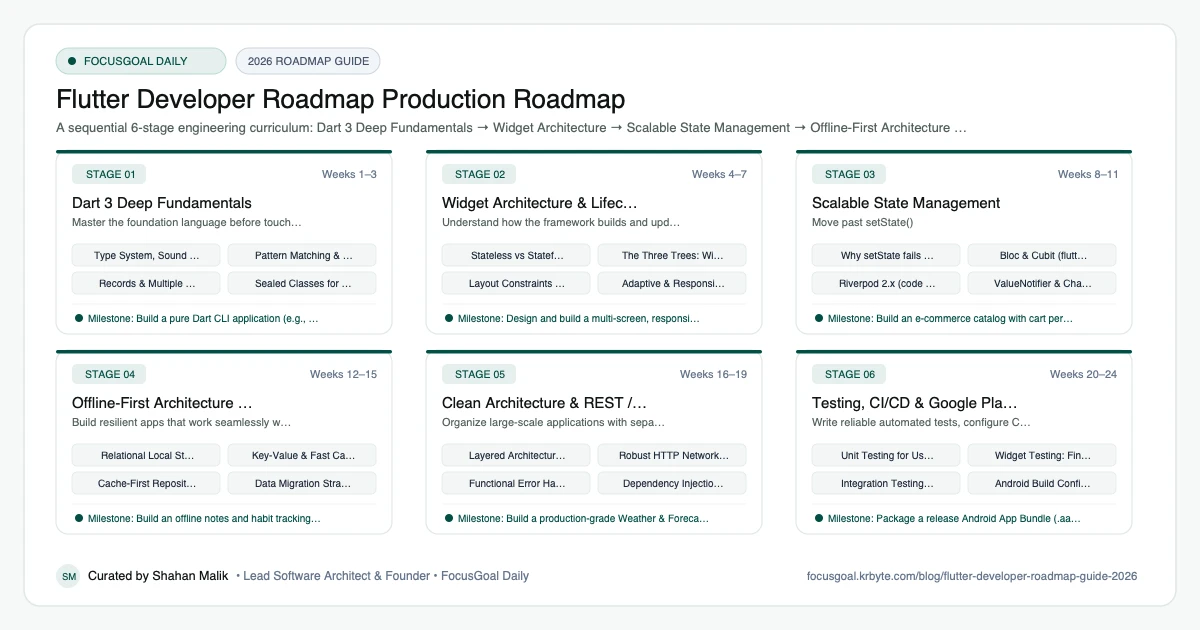
The 6 Production Stages
Follow these structured, sequential stages to systematically build production competence:
Dart 3 Deep Fundamentals
Master the foundation language before touching Flutter UI widgets. Learn sound null safety, pattern matching, records, sealed class hierarchies, and asynchronous streams.
Widget Architecture & Lifecycle
Understand how the framework builds and updates UI. Demystify the three trees (Widget, Element, RenderObject) and build responsive layouts.
Scalable State Management
Move past setState(). Learn predictable, testable state management suited for real-world enterprise apps.
Offline-First Architecture & SQLite
Build resilient apps that work seamlessly without an internet connection. Master relational databases, caching, and background sync.
Clean Architecture & REST / GraphQL Networking
Organize large-scale applications with separation of concerns: Presentation, Domain, and Data layers.
Testing, CI/CD & Google Play Deployment
Write reliable automated tests, configure CI pipelines, and publish your Android application bundle to the Google Play Store.
Is Flutter Worth Learning in 2026?
Flutter is a strong choice if you want to build for Android and iOS, and also web and desktop, from one Dart codebase. Its widget system and hot reload make it fast to prototype, and the documentation is thorough.
The trade-offs: Dart is mostly used within Flutter, so the language skill is less portable than JavaScript. Some teams prefer fully native or React Native stacks, and job demand varies a lot by country and company. Browse current local job listings to see how many roles ask for Flutter before you commit.
- Best fit: solo builders, startups, and teams wanting one UI codebase.
- Learning curve: moderate, mainly Dart and the widget tree.
- Weak spot: deep platform-specific features may need native code.
Flutter vs React Native vs Native: Which to Learn First?
Flutter renders its own UI and gives consistent visuals across platforms. React Native uses JavaScript or TypeScript and maps to native components, which suits web developers. Native Kotlin or Swift gives the most direct platform access but needs separate codebases.
If you know React, read the React Native developer roadmap. If you want to go deep on one platform, see the Android developer roadmap or the iOS developer roadmap. If you are brand new to coding, Flutter's single toolkit can be an easier first step than juggling several.
Flutter Setup: Tools You Need
Install the Flutter SDK from the official documentation and run flutter doctor, which reports what is missing on your machine. Flutter works on Windows, macOS, and Linux, though building for iOS requires a Mac with Xcode.
Use VS Code or Android Studio with the Flutter and Dart plugins. Learn DevTools early, since the widget inspector and performance view will save you hours of guessing.
- Flutter SDK and flutter doctor.
- VS Code or Android Studio with Dart and Flutter plugins.
- Android emulator or a physical Android phone.
- Xcode and a Mac if you want iOS builds.
- Git and a GitHub account.
Portfolio Projects & How to Get a Flutter Developer Job
Build apps that look like real products: authentication, a list-and-detail flow, offline storage, error handling, and tests. Put the code on GitHub with a README, screenshots, and a short note on why you chose your state management approach.
In interviews, expect questions on widget lifecycle, the difference between stateless and stateful widgets, async programming in Dart, and how you avoid unnecessary rebuilds. Showing one published app, even on an internal test track, sets you apart from tutorial-only candidates.
- Expense or habit tracker with local database.
- API-powered weather or news app with caching.
- E-commerce style app with cart and checkout flow.
- Notes app with sync to a backend of your choice.
- A published app with a clean store listing.
Beginner Pitfalls vs Production Reality
Self-taught developers commonly waste months making avoidable structural mistakes. Here is how production engineers approach these challenges:
Master Flutter with Daily Discipline in FocusGoal
Becoming a professional Flutter developer requires consistent practice across many months. FocusGoal Daily breaks this exact curriculum into daily micro-goals.
- Interactive roadmap curriculum matching this exact 6-stage blueprint.
- 100% offline study support powered by local SQLite database on Android.
- Ask AI tutor embedded in every stage for on-demand code clarifications.
- Habit streak tracker to keep you committed until your first app is published.
Track this roadmap,
one topic at a time.
Download FocusGoal, pick this roadmap and finish your first daily topic in minutes.
Frequently Asked Questions
Is Flutter still relevant and in-demand in 2026?
Yes. Flutter remains Google's primary cross-platform UI framework with extensive enterprise adoption (BMW, Alibaba, Nubank). With Impeller fully matured, performance is comparable to native code.
Should I learn native Android (Kotlin) or Flutter first?
If you want to ship to both Android and iOS with one clean codebase, Flutter is the most efficient starting point. Having a working understanding of native Gradle and Android manifests will make you a senior-level Flutter engineer faster.
Which state management approach is best for beginners: Bloc or Riverpod?
Both are industry standards. Bloc enforces strict unidirectional event-to-state architecture preferred by banks and enterprises. Riverpod offers lightweight syntax and compile-safe dependency injection. Choose one and master it deeply.
How do I become a Flutter developer from scratch?
Start with Dart fundamentals, then build small apps using core widgets and layouts. Add state management, local storage, and API calls, and finish by publishing one complete app.
Flutter vs React Native: which should I learn?
Choose Flutter if you want one integrated toolkit and are happy learning Dart; choose React Native if you already know JavaScript or React. Both are used professionally, so match the choice to your background and target employers.
Do I need to know Dart before learning Flutter?
No separate course is required, but you must learn Dart as you go. Dart is approachable for anyone who knows another object-oriented language such as Java, C# or TypeScript.
Do I need a degree to become a Flutter developer?
No. Employers typically care most about working apps, clean code, and problem-solving ability, though requirements vary by company.
How long does it take to become a Flutter developer?
It depends on your prior experience and how many hours you study each week. Plan for several months of consistent practice to build portfolio-ready apps, and expect more time if programming is new to you.
How does FocusGoal Daily help me learn Flutter?
FocusGoal Daily turns this 24-week roadmap into bite-sized daily tasks, tracks your study streaks, and tests your retention with an offline-first mobile curriculum on Android.
Start Your Flutter Developer Roadmap Today
Follow structured daily goals, study 100% offline with local SQLite, and get on-demand AI guidance with FocusGoal Daily on Android.
Get FocusGoal Daily Free on Google Play