React Native Developer Roadmap (2026): Expo & New Architecture Guide
Master modern cross-platform mobile development using React Native's New Architecture (Fabric, TurboModules, JSI), Expo Router, TypeScript, and offline SQLite persistence.

What's in this guide
The Short Answer: React Native in 2026
React Native in 2026 is fundamentally different from its early days. The legacy asynchronous bridge has been completely superseded by the New Architecture: synchronous C++ JavaScript Interface (JSI), the Fabric rendering engine, and TurboModules.
Furthermore, the Expo ecosystem has matured into the recommended production standard for React Native. With Expo Router providing file-based routing and EAS (Expo Application Services) streamlining cloud builds, developers can write high-performance native code with web-like development velocity.
Do not configure raw native boilerplate manually. Leverage Expo and the New Architecture to write type-safe, JSI-accelerated mobile apps that deliver true 60–120 FPS performance.
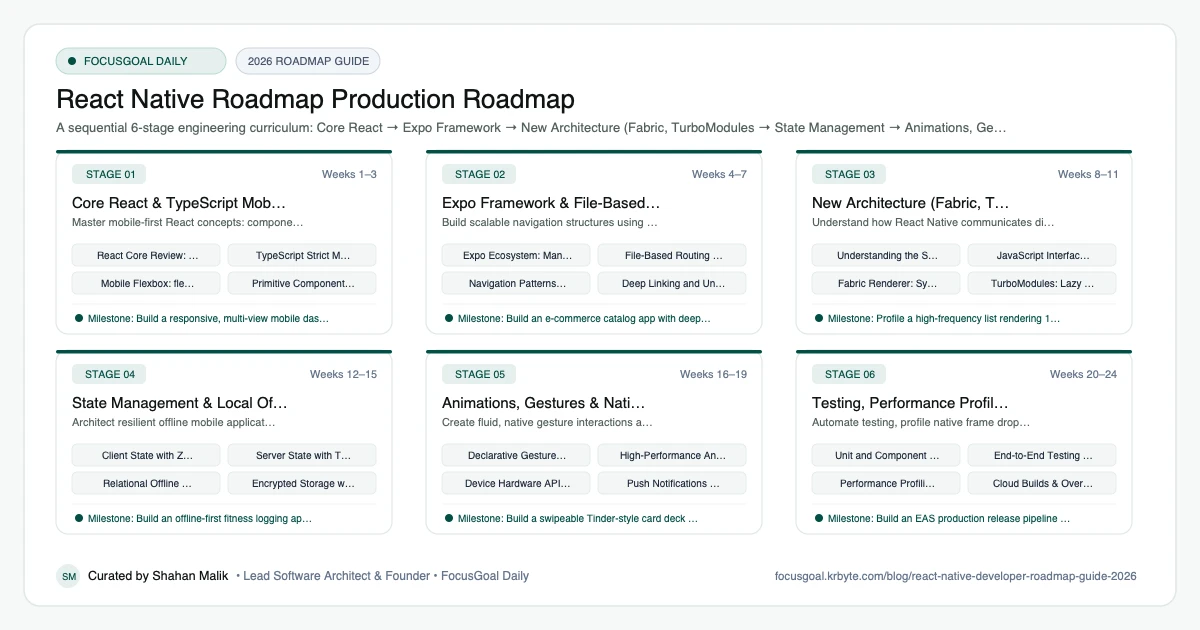
The 6 Production Stages
Follow these structured, sequential stages to systematically build production competence:
Core React & TypeScript Mobile Fundamentals
Master mobile-first React concepts: component lifecycle, hooks, flexbox mobile layouts, and strict TypeScript typing.
Expo Framework & File-Based Routing
Build scalable navigation structures using Expo Router, deep linking, and adaptive native layouts.
New Architecture (Fabric, TurboModules & JSI)
Understand how React Native communicates directly with native code via C++ and direct memory sharing.
State Management & Local Offline Storage
Architect resilient offline mobile applications with modern state stores and local SQLite databases.
Animations, Gestures & Native Device APIs
Create fluid, native gesture interactions and access hardware capabilities like camera, biometric auth, and notifications.
Testing, Performance Profiling & Store Release
Automate testing, profile native frame drops, and deploy production builds to Google Play and the Apple App Store.
Is React Native Worth Learning in 2026?
For many developers the answer is yes, mainly because React Native lets you reuse skills you already have. If you know React and TypeScript, you can build real iOS and Android apps without learning two separate native stacks, and the official documentation recommends starting with a framework such as Expo.
The honest caveats: you still need to understand native platforms when something breaks, performance tuning takes real effort, and some companies prefer fully native teams. Demand varies by country and industry, so review current local job listings rather than trusting any generic claim.
- Best fit: web developers moving to mobile and startups shipping to both stores.
- Learning curve is gentle if you know React, steeper for native modules.
- Weak spot: very hardware-heavy or graphics-intensive apps.
React Native vs Flutter vs Native: Which to Learn First?
React Native uses JavaScript or TypeScript and real native UI components, which makes it natural for React developers. Flutter draws its own UI with Dart and gives very consistent visuals across devices. Fully native development gives the deepest platform access but means maintaining two codebases.
If your background is web, start with React Native. If you want one toolkit and are fine learning Dart, read the Flutter developer roadmap. If you want to specialise on one platform, see the iOS developer roadmap or the Android developer roadmap. If your web skills are still thin, the frontend developer roadmap is a strong foundation.
React Native Setup: Tools You Need
You can start with a laptop, Node.js, and a code editor. Expo lets you run your app on a physical phone through Expo Go or a development build, so you do not need to configure native toolchains on day one.
When you need custom native code or store builds, you will add Xcode (macOS only) for iOS and Android Studio for the Android emulator and SDK. Install them early enough to be comfortable, but do not let setup delay your first screen.
- Node.js (LTS), a package manager, and Git.
- TypeScript and an editor with good type support.
- Expo CLI and the Expo documentation.
- Android Studio, plus Xcode if you have a Mac.
- A real phone for testing gestures and performance.
Portfolio Projects & How to Get a React Native Job
Hiring managers want evidence that you can ship. Build two or three polished apps that use real APIs, handle loading and error states, work offline where it makes sense, and run on both platforms. Link a short demo video and a clean README for each.
On your resume, describe decisions rather than tools: why you chose a state library, how you fixed a slow list, how you handled permissions. Expect interviews to cover React fundamentals, TypeScript, navigation, and debugging a performance problem.
- Habit or task tracker with local storage and notifications.
- Marketplace or news app with authentication and a paginated feed.
- Chat or collaboration app with real-time updates.
- Fitness or travel app that uses camera, location, or maps.
- Publish at least one app to a store or a TestFlight/internal test track.
Beginner Pitfalls vs Production Reality
Self-taught developers commonly waste months making avoidable structural mistakes. Here is how production engineers approach these challenges:
Master Cross-Platform Engineering with FocusGoal Daily
React Native evolves fast. FocusGoal Daily keeps you grounded by structuring cross-platform concepts into consistent daily micro-goals.
- Structured curriculum covering TypeScript, Expo Router, Reanimated, and the New Architecture.
- 100% offline study support powered by local SQLite database on Android.
- Ask AI tutor for immediate code analysis and architecture advice.
- Daily streak tracking to maintain momentum toward shipping cross-platform apps.
Track this roadmap,
one topic at a time.
Download FocusGoal, pick this roadmap and finish your first daily topic in minutes.
Frequently Asked Questions
Is Expo recommended for production apps in 2026?
Yes. The official React Native documentation now explicitly recommends Expo as the default framework for building production applications.
Should I learn Flutter or React Native?
If you already know JavaScript/TypeScript and React, React Native provides the smoothest transition. If you prefer a unified end-to-end framework with Google's Impeller engine, Flutter is also an exceptional choice.
What is React Native's New Architecture?
The New Architecture replaces the old asynchronous JSON bridge with JSI (JavaScript Interface), TurboModules, and the Fabric renderer, allowing direct C++ memory access and synchronous UI updates.
How do I become a React Native developer from scratch?
Learn modern JavaScript and TypeScript first, then React fundamentals, then build small apps with Expo. Ship one real app to a device before moving on to native modules and the New Architecture.
Is React Native still worth learning in 2026?
Yes, if you already know or want to learn React and TypeScript. It remains a mainstream way to build iOS and Android apps from one codebase, but check current job listings in your region to confirm demand.
React Native vs Flutter: which should I learn first?
Pick React Native if you know JavaScript or React, and Flutter if you are starting fresh and like a single batteries-included toolkit with Dart. Both can get you hired, so the best choice is the one you will actually finish projects in.
Do I need to know native iOS or Android to use React Native?
Not to get started, since Expo handles most native setup. You will eventually benefit from basic Xcode and Android Studio knowledge for debugging builds and writing custom native modules.
How long does it take to become a React Native developer?
It depends on your starting point. Someone already comfortable with React can build a first app within weeks, while a complete beginner should plan for several months of consistent practice before applying for jobs.
How does FocusGoal Daily help React Native developers?
FocusGoal Daily breaks down the vast React Native ecosystem into manageable daily learning checklists with offline streak tracking on Android.
Start Your React Native Roadmap Today
Follow structured daily goals, study 100% offline with local SQLite, and get on-demand AI guidance with FocusGoal Daily on Android.
Get FocusGoal Daily Free on Google Play