Frontend Developer Roadmap (2026): From Zero to Production
Master the foundational web platform, modern CSS layout engines, TypeScript strict mode, React 19 component architecture, and production performance optimization without getting trapped in library fatigue.

What's in this guide
The Short Answer: Web Engineering in 2026
The web ecosystem in 2026 has entered an era of consolidation. The days of churning through a brand new build tool every three months have given way to stable, mature standards: Vite, TypeScript strict mode, React 19, and native CSS design tokens.
However, many junior engineers skip the fundamental web platform. They install UI component libraries and state managers without understanding semantic HTML, keyboard accessibility, CSS cascade layers, or browser render trees. Real engineering competence comes from understanding how browsers parse, render, and execute code.
Just getting started? Read how to become a frontend developer step by step for the beginner-first plan.
Master the platform first. A deep understanding of semantic HTML, responsive CSS, and strict TypeScript makes adopting any modern UI framework effortless.
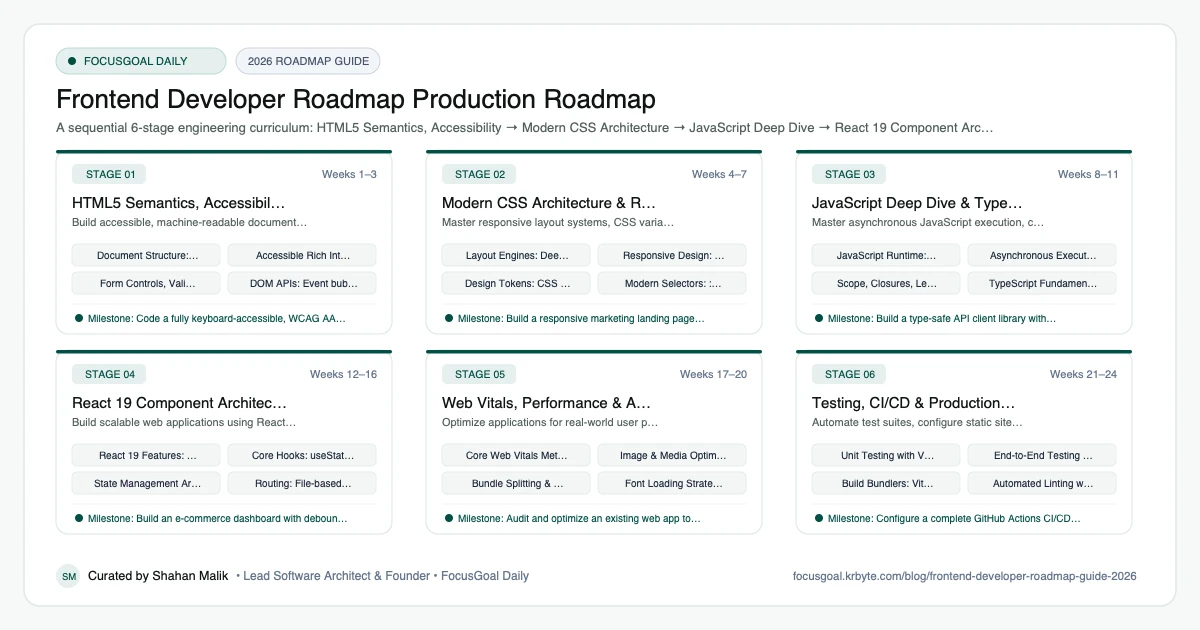
The 6 Production Stages
Follow these structured, sequential stages to systematically build production competence:
HTML5 Semantics, Accessibility & The DOM
Build accessible, machine-readable documents using semantic HTML elements, ARIA attributes, and DOM manipulation.
Modern CSS Architecture & Responsive Design
Master responsive layout systems, CSS variables, and modern styling techniques without relying on bulky CSS libraries.
JavaScript Deep Dive & TypeScript Strict Mode
Master asynchronous JavaScript execution, closures, prototypes, and enterprise-grade TypeScript types.
React 19 Component Architecture & State
Build scalable web applications using React 19's unified programming model, Actions, Server Components, and client state.
Web Vitals, Performance & Asset Optimization
Optimize applications for real-world user performance: Largest Contentful Paint (LCP), Interaction to Next Paint (INP), and Cumulative Layout Shift (CLS).
Testing, CI/CD & Production Deployment
Automate test suites, configure static site generators or server runtimes, and deploy with continuous integration. For end-to-end testing and quality gates, explore our complete QA Roadmap 2026.
Is Frontend Development Worth It in 2026?
Yes, for people who like building things users see and touch. Every product with a web interface needs frontend engineers, and the skills (HTML, CSS, JavaScript, TypeScript, React) are among the most widely taught and documented in software. You can start with only a laptop and a browser, and the feedback loop is fast, which keeps beginners motivated.
The honest caveats: entry-level competition is real, and tutorials alone do not stand out. AI code assistants also make boilerplate faster, so employers increasingly value judgment on accessibility, performance, and architecture. Pay and demand differ by country and seniority, so check current local job listings rather than relying on a single number.
- Strong fit if you enjoy design details, interaction, and visible results.
- Learning curve: HTML and CSS are gentle; async JavaScript, state, and rendering take sustained practice.
- The ecosystem moves quickly, so fundamentals matter more than any one framework.
Frontend vs Backend vs Full-Stack: Which to Learn First
Start with frontend if you want quick visual progress and a gentle entry into programming. Start with backend if you prefer data, logic, and systems over interfaces. Full-stack is usually a destination rather than a starting point: most people reach it by getting solid in one side first and then adding the other.
Whichever you pick, you will touch the other side often. Explore the Full-Stack Developer Roadmap for how the pieces connect, or the Node.js Developer Roadmap if you want to reuse your JavaScript skills on the server.
Frontend Developer Setup: Tools You Need
You do not need expensive hardware. A modern laptop, an up-to-date browser, and a code editor such as VS Code are enough to begin. Add Node.js to run build tools and package managers, and Git with a GitHub account so your work is versioned and visible to employers.
Learn browser DevTools early; they are the most important debugging tool you will use. As you progress, add a component workflow (Vite or a framework CLI), a linter and formatter, and a testing tool. Check each tool's official documentation for current install steps.
- Editor: VS Code or a similar editor with ESLint and Prettier extensions.
- Runtime and package manager: Node.js with npm or pnpm.
- Version control: Git and GitHub.
- Browser DevTools plus Lighthouse for performance and accessibility checks.
Frontend Portfolio Projects & How to Get a Job
Hiring managers want proof you can ship. Build three or four deployed projects that show different skills: a responsive marketing site, an interactive app with API data and loading and error states, and one project with authentication or a real-time feature. Write a short README explaining decisions and trade-offs.
On your resume, link live demos and source code, and describe what problem each project solves. In interviews, expect JavaScript fundamentals, a React or component exercise, and questions on accessibility and performance. Contributing a small fix to an open-source project is a credible extra signal.
- Project idea: a dashboard consuming a public API with search, filters, and pagination.
- Project idea: an accessible, keyboard-friendly form flow with validation.
- Project idea: a performance-tuned content site with strong Lighthouse scores.
- Practice explaining your code out loud; interviews test communication too.
Beginner Pitfalls vs Production Reality
Self-taught developers commonly waste months making avoidable structural mistakes. Here is how production engineers approach these challenges:
Stay Consistent in Web Engineering with FocusGoal Daily
The frontend landscape changes rapidly. FocusGoal Daily helps you build strong engineering habits by breaking complex topics into daily micro-goals.
- Structured roadmap covering HTML, CSS, TypeScript, React, and Web Vitals.
- 100% offline study support powered by local SQLite database on Android.
- In-context AI tutor to explain tricky concepts like Closures, Event Loop, or CSS Grid.
- Daily streak tracking to keep your coding habit consistent every single day.
Track this roadmap,
one topic at a time.
Download FocusGoal, pick this roadmap and finish your first daily topic in minutes.
Frequently Asked Questions
Do I need to learn TypeScript, or is JavaScript enough in 2026?
TypeScript is now the industry standard for professional frontend development. More than 80% of modern codebases mandate TypeScript. Learning TypeScript early makes you a significantly stronger, more hireable developer.
Should I learn React or Next.js first?
Learn React core fundamentals first (component lifecycles, hooks, state, props). Once you understand how React renders and updates UI, transitioning to Next.js for server-side rendering and routing is straightforward.
How long does it take to become a hireable frontend developer?
By practicing 1.5 to 2 hours per day with a structured daily roadmap, most learners build strong junior-level competence in 5 to 6 months, demonstrated through 3–4 production portfolio projects.
How do I become a frontend developer from scratch?
Learn HTML, CSS, and JavaScript first, then add TypeScript and a framework such as React, and build deployed projects as you go. Follow a structured roadmap so you do not jump between topics. Consistent daily practice matters more than speed.
Is frontend development still worth learning in 2026?
Yes. Every web product needs a user interface, and demand for engineers who handle accessibility, performance, and complex state remains. AI tools speed up boilerplate but do not replace understanding, so fundamentals still pay off.
Frontend vs full-stack: which should I learn first?
Learn frontend first if you want quick visual feedback, then add backend skills later. The Full-Stack Developer Roadmap shows how to extend what you already know.
Do I need a degree to become a frontend developer?
No degree is strictly required for many frontend roles, though some employers prefer one. A strong portfolio of deployed projects and clear technical communication carry a lot of weight. Requirements vary by company and country.
How does FocusGoal Daily help web developers?
FocusGoal Daily breaks the massive web development curriculum into digestible daily micro-goals, tracks your habit streaks, and provides on-demand AI explanations offline on Android.
Start Your Frontend Developer Roadmap Today
Follow structured daily goals, study 100% offline with local SQLite, and get on-demand AI guidance with FocusGoal Daily on Android.
Get FocusGoal Daily Free on Google Play