Electronics Engineering Roadmap (2026): From Circuit Schematics to Custom Silicon
Learn how to build commercial electronic hardware. Master analog signal conditioning, high-speed multi-layer PCB design, bare-metal microcontroller firmware, and FPGA digital synthesis.

What's in this guide
The Short Answer: Electronics Engineering in 2026
Hardware is everywhere—from smartphones and medical wearables to electric vehicles and IoT sensors. In 2026, electronics engineering demands a balanced mastery of both physical hardware (analog circuits, schematics, PCB layout, signal integrity) and embedded software (bare-metal firmware, RTOS, communication buses).
Modern tools like KiCad 8 and open-source FPGA toolchains have made custom hardware design accessible to self-directed engineers without requiring multimillion-dollar labs.
A schematic is only half the battle. Good PCB layout—unbroken ground return paths, decoupling capacitor placement, and impedance matching—is what separates functional hardware from an erratic RF noise generator.
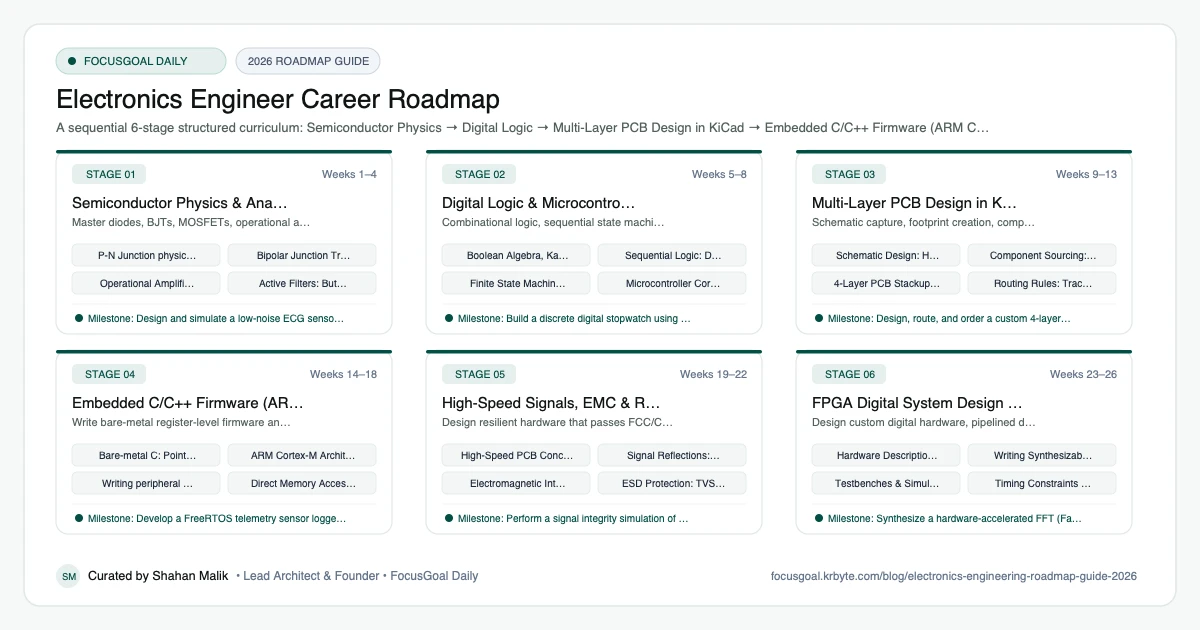
The 6 Production Stages
Follow these structured, sequential stages to systematically build production competence:
Semiconductor Physics & Analog Circuit Design
Master diodes, BJTs, MOSFETs, operational amplifiers, and analog active filter topologies.
Digital Logic & Microcontroller Architecture
Combinational logic, sequential state machines, and internal architecture of microcontrollers (ALU, registers, memory bus).
Multi-Layer PCB Design in KiCad & Altium
Schematic capture, footprint creation, component placement, 4-layer stackup design, and manufacturing Gerber generation.
Embedded C/C++ Firmware (ARM Cortex-M & FreeRTOS)
Write bare-metal register-level firmware and concurrent multi-tasking applications on ARM Cortex-M processors.
High-Speed Signals, EMC & RF Basics
Design resilient hardware that passes FCC/CE electromagnetic compliance (EMC) and handles high-speed impedance-matched signals.
FPGA Digital System Design (Verilog / VHDL)
Design custom digital hardware, pipelined data processors, and high-speed interfaces using Verilog and modern FPGAs.
Is Electronics Engineering a Good Career in 2026?
Electronics engineering sits behind consumer devices, wearables, medical equipment, automotive electronics, IoT, and communications hardware. As more products add sensing and connectivity, hardware skills stay relevant, and they pair well with firmware knowledge.
The caveats: hardware iteration is slower and costlier than software, some design work concentrates in particular regions, and parts availability can affect projects. Compare local job listings and official labour statistics for pay and demand rather than assuming a number.
- Good fit if you enjoy building, debugging, and measuring real circuits.
- Skills transfer to embedded, test, and RF roles.
- Debugging with instruments is a core day-to-day skill.
Software & Tools Electronics Engineers Use
Electronics work combines design software with bench instruments. Learning to read datasheets and use an oscilloscope confidently is as important as any software skill.
Start with free or student tools, since concepts such as schematic capture, footprints, and design-rule checks carry across packages.
- Schematic and PCB: KiCad, Altium Designer, Autodesk Eagle/Fusion, OrCAD.
- Simulation: LTspice, Multisim, PSpice.
- Bench instruments: oscilloscope, multimeter, logic analyser, power supply.
- HDL: Verilog or VHDL for FPGA work.
- Standards: IPC guidelines for PCB design and assembly.
Degrees, Licensing & How to Get Your First Electronics Engineering Job
Most employers expect a bachelor's degree in electronics, electrical, or a related engineering field. Professional licensing is uncommon for product-design roles, though registration or chartership may exist in your country and can help in some sectors. Requirements vary, so check your local engineering body.
Your portfolio matters a great deal: a designed and assembled PCB, a documented sensor board, or an FPGA project shows practical ability. Add internships, hackathons, and open-source hardware contributions.
- Design, fabricate, and debug at least one custom PCB.
- Write up schematics, test results, and lessons learned.
- Pursue internships in test, validation, or hardware design.
- Check local registration options with your engineering body.
Beginner Pitfalls vs Production Reality
Self-taught developers commonly waste months making avoidable structural mistakes. Here is how production engineers approach these challenges:
Master Electronics Engineering with FocusGoal Daily
Electronics engineering spans intricate register addresses, PCB layout rules, and circuit mathematics. FocusGoal Daily turns high-complexity engineering into manageable daily milestones.
- Structured daily micro-goals for schematic design, firmware drivers, and PCB routing.
- Track study streaks offline while working at lab benches and soldering stations.
- Instant AI explanations for op-amp configurations, differential impedance calculations, and SPI bus debugging.
Track this roadmap,
one topic at a time.
Download FocusGoal, pick this roadmap and finish your first daily topic in minutes.
Frequently Asked Questions
Should I learn KiCad or Altium Designer?
KiCad 8 is free, open-source, and fully capable of professional multi-layer designs. Altium Designer is the dominant corporate standard in high-end consumer electronics and aerospace. Learning KiCad first makes transitioning to Altium straightforward.
Do I need an oscilloscope to learn electronics?
A basic 2-channel 50MHz-100MHz digital storage oscilloscope (like a Rigol or Siglent) or a USB logic analyzer (like Saleae) is invaluable for observing real-world signals, SPI communication, and ringing.
What programming language is best for hardware engineers?
C remains the undisputed king of microcontroller firmware, followed by C++ for modular embedded systems. Python is the gold standard for automated lab test benches and data processing.
What does an electronics engineer do?
An electronics engineer designs and tests circuits and devices, from sensors and power supplies to communication modules and consumer products. Work typically includes schematic design, PCB layout, prototyping, and debugging with lab instruments.
Is electronics engineering hard?
It has a real learning curve because you combine theory with hands-on debugging. Building small circuits alongside your coursework makes concepts like filters, amplifiers, and digital logic far more intuitive.
How long does it take to become an electronics engineer?
A bachelor's degree usually takes about four years in many countries, and some people enter through diplomas or technician routes first. Time to competence depends on how much hands-on project work you do.
Electronics vs electrical engineering: which is better?
Neither is better; they suit different interests. Choose electronics for small-scale circuits and devices, and electrical for power systems and large equipment.
Do I need a license to work as an electronics engineer?
Usually not for product design and embedded roles. Some countries offer chartered or registered engineer titles, so check your local engineering body for what applies to you.
Start Your Electronics Engineer Today
Follow structured daily goals, study 100% offline with local SQLite, and get on-demand AI guidance with FocusGoal Daily on Android.
Get FocusGoal Daily Free on Google Play