UX Designer Roadmap (2026): From User Research to Usability Testing Guide
Master user research methodologies, empathy mapping, information architecture, low-fidelity wireframing, interactive usability testing, and product metric validation.

What's in this guide
The Short Answer: UX Design in 2026
User Experience design is the strategic core of software product development. In 2026, building successful software is not about guessing features; it is about uncovering genuine user pain points through disciplined qualitative and quantitative research.
A great UX designer is an empathetic investigative researcher and systems architect: they formulate hypotheses, conduct user interviews, map multi-channel customer journeys, simplify complex workflows, and scientifically validate solutions through usability testing.
Just getting started? Read how to become a UX designer step by step for the beginner-first plan.
You are not your user. Fall in love with the problem, not your first solution. Base every design decision on verified user research and usability data.
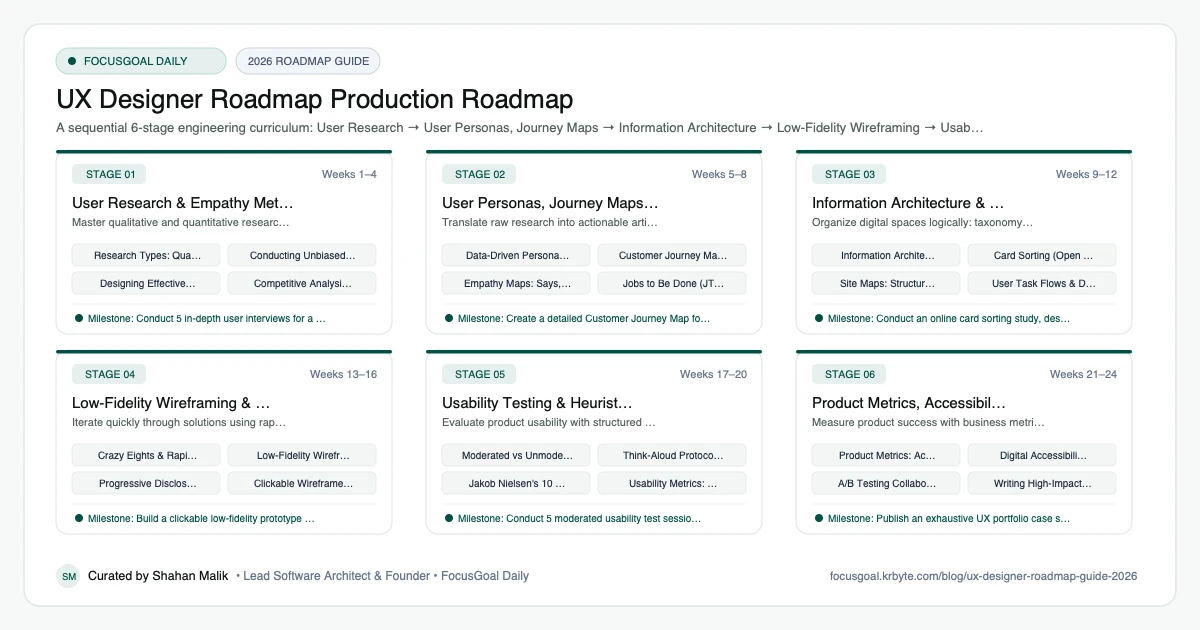
The 6 Production Stages
Follow these structured, sequential stages to systematically build production competence:
User Research & Empathy Methodologies
Master qualitative and quantitative research techniques: user interviews, surveys, field studies, and competitive analysis.
User Personas, Journey Maps & Mental Models
Translate raw research into actionable artifacts that guide product teams and align stakeholders.
Information Architecture & Navigation Flows
Organize digital spaces logically: taxonomy, card sorting, site maps, and user task flows.
Low-Fidelity Wireframing & Prototyping
Iterate quickly through solutions using rapid paper sketching, low-fi digital wireframes, and clickable prototypes.
Usability Testing & Heuristic Evaluation
Evaluate product usability with structured user testing sessions and Jakob Nielsen's 10 usability heuristics.
Product Metrics, Accessibility & Case Studies
Measure product success with business metrics, ensure universal accessibility, and write compelling portfolio case studies.
Is UX Design Worth It in 2026?
Yes, for people who like understanding people and solving problems with evidence. UX design helps products become easier to use, and good research prevents teams from building the wrong thing. The skills are useful in product management, research, and design roles alike.
The honest caveat is that the junior market is competitive and short bootcamp-style portfolios look alike. What stands out is real research, clear thinking, and measurable learning from tests. Hiring varies by region and industry, so check current local job listings.
- Good fit if you are curious, empathetic, and analytical.
- Research and writing matter as much as visual skill.
- Opportunities exist in product, research, service, and content design.
UX vs UI vs Product Design: Which to Learn First
UX design centers on research, journeys, information architecture, and usability. UI design emphasizes visual systems and polish, as outlined in the UI Designer roadmap. Product design often combines both and adds strategy and business context.
If you enjoy investigating problems, start with UX research and flows, then add visual skills to communicate your ideas clearly. Product-minded designers also benefit from understanding how software is built; the Frontend Developer roadmap is a useful companion.
- UX: research, flows, wireframes, usability testing.
- UI: visual design and component systems.
- Product design: end-to-end problem solving and trade-offs.
UX Design Setup: Tools You Need
Start with Figma or a similar tool for wireframes and prototypes, plus a whiteboard tool such as FigJam or Miro for journey maps and workshops. Use a spreadsheet or notes app to organize research findings, and a survey tool for questionnaires.
For usability tests, a screen-sharing app and a simple consent script are enough at the beginning. Learn how to write good interview questions and how to synthesize notes into themes, because tools matter less than method.
- Figma or similar for wireframes and clickable prototypes.
- FigJam or Miro for mapping and synthesis.
- Survey and video-call tools for research.
- A repeatable template for interview notes.
UX Portfolio Projects & How to Get a Job
Show your thinking from problem to outcome. A strong case study includes the research question, the participants, what you learned, how it changed the design, and what you would test next. Be honest about sample size and limitations; real constraints are more credible than perfect stories.
Aim for two or three deep case studies instead of many shallow ones. In interviews expect questions about how you handled disagreement with stakeholders, how you prioritized findings, and what you do when data conflicts.
- Run interviews and usability tests on an existing app and report findings.
- Map a complete user journey and propose prioritized improvements.
- Redesign an information architecture with a card sort.
- Test a prototype with five users and document the iteration.
Beginner Pitfalls vs Production Reality
Self-taught developers commonly waste months making avoidable structural mistakes. Here is how production engineers approach these challenges:
Master UX Strategy with FocusGoal Daily
UX design requires rigorous research discipline and structured analytical thinking. FocusGoal Daily breaks this critical craft into manageable daily learning steps.
- Structured curriculum from user research to journey mapping, IA, and usability testing.
- 100% offline study support powered by local SQLite database on Android.
- In-app Ask AI tutor to clarify research interview questions, heuristics, and SUS scoring.
- Daily streak tracking to maintain momentum toward senior product UX roles.
Track this roadmap,
one topic at a time.
Download FocusGoal, pick this roadmap and finish your first daily topic in minutes.
Frequently Asked Questions
What is the difference between qualitative and quantitative UX research?
Qualitative research (interviews, usability testing) reveals 'why' users behave a certain way and what they feel. Quantitative research (surveys, analytics, A/B testing) reveals 'what' happened at scale.
How many users do I need to test for usability?
According to Nielsen Norman Group research, testing with 5 users uncovers approximately 85% of core usability problems in an interface.
Do I need a psychology degree to become a UX designer?
No. While understanding cognitive psychology (mental models, cognitive load) is helpful, anyone can become a skilled UX designer by practicing structured research methodologies and usability testing.
Is UX design a good career in 2026?
Yes for people who enjoy research and problem solving, though the junior market is competitive. Case studies that show real research and iteration make a difference.
What does a UX designer do day to day?
UX designers research users, map journeys, create wireframes and prototypes, run usability tests, and work with product and engineering teams. The mix depends on the company.
Do I need a degree to become a UX designer?
No degree is strictly required at most companies, though some employers prefer one. A portfolio showing real process matters most.
How do I do UX research with no experience?
Recruit a handful of people who fit your target audience, run short interviews or usability tests, and document what you learned. Ethical consent and clear notes are important.
How is UX different from UI?
UX is about how the whole experience works and whether it meets user needs, while UI is about the visual and interactive layer. They are closely related and often overlap in roles.
How does FocusGoal Daily help UX designers?
FocusGoal Daily organizes the vast UX research and product design methodologies into clear daily study checklists with offline access on Android.
Start Your UX Designer Roadmap Today
Follow structured daily goals, study 100% offline with local SQLite, and get on-demand AI guidance with FocusGoal Daily on Android.
Get FocusGoal Daily Free on Google Play