UI Designer Roadmap (2026): Figma, Design Systems & Visual Craft Guide
Master modern digital UI design: visual hierarchy, typography scales, color science, advanced Figma variables, reusable design systems, and engineering handoff.

What's in this guide
The Short Answer: UI Design in 2026
User Interface design in 2026 has matured beyond making arbitrary decorative illustrations. Modern UI design is an architectural discipline rooted in systemic typography scales, accessible color science, spatial grids, and shared design tokens.
The most sought-after UI designers speak the language of engineering: they understand how auto-layout maps to CSS Flexbox, how variables translate into design tokens, and how responsive components behave across phones, tablets, and desktop displays.
Just getting started? Read how to become a UX designer for the beginner-first plan.
Design systems, not isolated screens. Master Figma variables, typography hierarchy, and accessible color contrast to create interfaces that developers can build accurately.
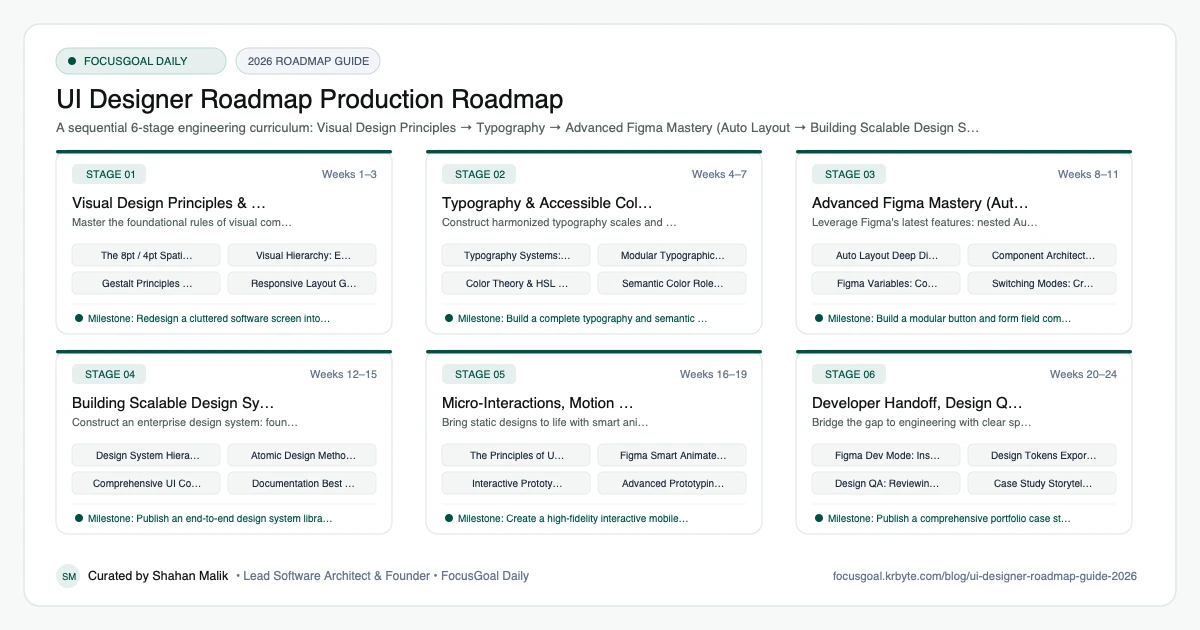
The 6 Production Stages
Follow these structured, sequential stages to systematically build production competence:
Visual Design Principles & Spatial Systems
Master the foundational rules of visual communication: visual hierarchy, whitespace, balance, and 8pt grid systems.
Typography & Accessible Color Systems
Construct harmonized typography scales and mathematically generated, WCAG AA compliant color palettes.
Advanced Figma Mastery (Auto Layout & Variables)
Leverage Figma's latest features: nested Auto Layout, component properties, variants, and design variables.
Building Scalable Design Systems
Construct an enterprise design system: foundational primitives, semantic tokens, and component libraries.
Micro-Interactions, Motion & Prototyping
Bring static designs to life with smart animations, gesture prototyping, and micro-interactions.
Developer Handoff, Design QA & Portfolio
Bridge the gap to engineering with clear specs, design tokens, and build a high-impact product design portfolio.
Is UI Design Worth It in 2026?
Yes, if you enjoy visual craft and want your work to ship in real products. Every app, website, and internal tool needs interface design, and the shift toward design systems means consistent, reusable work is valued. UI skills also complement front-end development and product design.
The honest caveat is that entry-level competition is strong and AI tools can generate decent mockups, so judgment, systems thinking, and collaboration matter more than pixel polish alone. Demand and pay vary by region, so check current local job listings rather than assuming a figure.
- Good fit if you notice spacing, typography, and consistency.
- Learning curve: tools are easy, taste and systems take practice.
- Understanding developer constraints makes you more employable.
UI vs UX vs Front-End Development: Which to Learn First
UI design focuses on the look and interaction details of an interface, while UX design focuses on research, flows, and usability, as covered in the UX Designer roadmap. Front-end development turns designs into working code; see the Frontend Developer roadmap.
Many teams want a designer who understands all three at a basic level. If you like visuals, start with UI fundamentals and add UX thinking early so your designs solve real problems. Learning basic HTML and CSS helps you design things that can actually be built.
- UI: layout, type, color, components, visual systems.
- UX: research, flows, testing, information architecture.
- Front-end: implementation in HTML, CSS, and JavaScript.
UI Design Setup: Tools You Need
Figma is the most common tool and has a free tier suitable for learning. Learn auto layout, components, variants, and variables, because they mirror how developers build interfaces. A decent monitor and a mouse help with precision, but you can start on a laptop.
Add a font library, an icon set, and a contrast-checking tool to test accessibility. Reading public design systems such as Material Design or Apple's guidelines teaches how professionals structure components and rules.
- Figma with auto layout, components, and variables.
- A contrast checker for accessible colors.
- Public design systems as reference material.
- Basic HTML and CSS knowledge for handoff.
UI Design Portfolio Projects & How to Get a Job
Show process as well as polish. Each case study should state the problem, your constraints, the decisions you made, and the final result. Redesigning an existing product is acceptable if you explain your reasoning and are honest that it is a concept.
Include at least one project that features a small design system with documented components and states. In interviews expect portfolio walkthroughs and design critiques, so practise explaining why you chose a layout and how you would handle edge cases such as empty or error states.
- Build a mini design system with tokens and a component library.
- Redesign a mobile app flow with annotated states.
- Create a responsive landing page and hand it off with specs.
- Do an accessibility review of an existing interface.
Beginner Pitfalls vs Production Reality
Self-taught developers commonly waste months making avoidable structural mistakes. Here is how production engineers approach these challenges:
Master UI Design Craft with FocusGoal Daily
UI design requires honing both aesthetic intuition and structured systems thinking. FocusGoal Daily turns this extensive craft into disciplined daily learning micro-goals.
- Structured curriculum from grid systems and typography to Figma variables and design systems.
- 100% offline study support powered by local SQLite database on Android.
- In-app Ask AI tutor to clarify contrast rules, font pairing, and Auto Layout structures.
- Daily streak tracking to maintain momentum toward senior product design competence.
Track this roadmap,
one topic at a time.
Download FocusGoal, pick this roadmap and finish your first daily topic in minutes.
Frequently Asked Questions
Do UI designers need to know how to code?
You do not need to write production code, but understanding HTML, CSS Flexbox/Grid, and responsive design makes you a vastly superior designer who designs buildable systems.
What is the difference between UI and UX design?
UX (User Experience) focuses on research, problem definition, workflows, and usability. UI (User Interface) focuses on visual hierarchy, typography, colors, component design, and aesthetics.
Is Figma the only tool I need to learn?
Figma is the overwhelming industry standard (used by >90% of tech companies). Mastering Figma variables, Auto Layout, and Dev Mode prepares you for virtually any product team.
Is UI design a good career in 2026?
Yes for people who enjoy visual and systems work, though entry-level competition is strong. A portfolio that shows real process and design-system thinking helps you stand out.
What is the difference between UI and UX design?
UI design shapes how an interface looks and behaves visually, while UX design covers research, user flows, and overall usability. Many roles combine both.
Do I need to know how to code to be a UI designer?
It is not required, but basic HTML and CSS help you design buildable interfaces and communicate with developers.
Is Figma enough to get a UI design job?
Figma is the main tool most teams use, but employers also look for strong fundamentals, communication, and portfolio quality.
Can I become a UI designer without a degree?
Yes, many designers are self-taught or come from other fields. A solid portfolio and clear case studies carry the most weight.
How does FocusGoal Daily help UI designers?
FocusGoal Daily organizes the extensive UI design principles into actionable daily learning checklists with offline access on Android.
Start Your UI Designer Roadmap Today
Follow structured daily goals, study 100% offline with local SQLite, and get on-demand AI guidance with FocusGoal Daily on Android.
Get FocusGoal Daily Free on Google Play