Unreal Engine Roadmap (2026): C++, Blueprints & Modern UE5 Guide
Master high-end AAA game engineering using Unreal Engine 5.5+, modern C++ architecture, Blueprints visual scripting, Nanite virtualized geometry, Lumen lighting, and Niagara VFX.

What's in this guide
The Short Answer: Unreal Engine 5 in 2026
Unreal Engine 5 is the premier engine for cutting-edge AAA games, cinematic virtual production, and architectural visualization. Features like Nanite (virtualized micropolygon geometry) and Lumen (fully dynamic global illumination and reflections) have fundamentally transformed graphics fidelity.
However, Unreal is an expansive, industrial-grade C++ engine with deep architectural conventions. Learning Unreal is not just about placing assets; it requires understanding the Gameplay Framework (GameMode, GameState, PlayerController, Pawn, Character) and combining C++ performance with Blueprint flexibility.
Just getting started? Read how to become a game developer and which engine to pick for the beginner-first plan.
Combine C++ for core gameplay systems and data structures with Blueprints for visual design and rapid iteration. Respect the Gameplay Framework hierarchy to build scalable games.
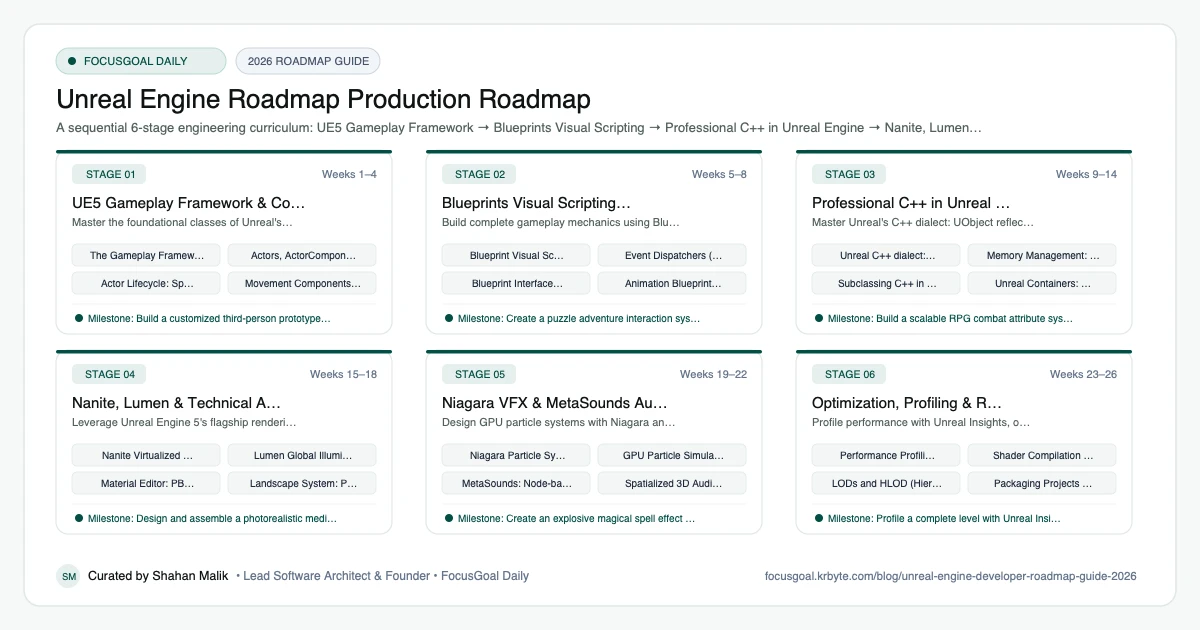
The 6 Production Stages
Follow these structured, sequential stages to systematically build production competence:
UE5 Gameplay Framework & Core Architecture
Master the foundational classes of Unreal's Gameplay Framework and Actor-Component model.
Blueprints Visual Scripting & Rapid Prototyping
Build complete gameplay mechanics using Blueprints, event dispatchers, and macro libraries.
Professional C++ in Unreal Engine
Master Unreal's C++ dialect: UObject reflection system, UPROPERTY/UFUNCTION macros, and memory management.
Nanite, Lumen & Technical Art Pipelines
Leverage Unreal Engine 5's flagship rendering systems to build photorealistic worlds.
Niagara VFX & MetaSounds Audio
Design GPU particle systems with Niagara and procedural, reactive audio with MetaSounds.
Optimization, Profiling & Release Packaging
Profile performance with Unreal Insights, optimize draw calls, and package commercial release builds.
Is Unreal Engine Worth Learning in 2026?
Yes, if you are drawn to high-fidelity 3D, large studios, or real-time visualization. Unreal Engine is used in games and also in film, architecture, automotive, and virtual production, so skills can apply outside entertainment. Blueprints let you prototype quickly while C++ handles performance-critical systems.
The honest caveat is complexity: the engine is large, projects are heavy, and C++ has a steep learning curve. Licensing terms can change, so read the current official terms. Check local job listings to see what studios in your region ask for.
- Good fit if you like 3D, rendering, and systems programming.
- Hardware requirements are higher than for lightweight engines.
- Blueprints are a gentle way in; C++ is the long-term path.
Unreal vs Unity vs Godot: Which to Learn First
Unreal emphasizes advanced rendering and large-scale 3D projects. Unity is more approachable for mobile and indie work and uses C#, as shown in the Unity Developer roadmap. Godot is lightweight and open source; see the Godot Developer roadmap.
If your goal is a studio job in 3D action or visualization, Unreal is a strong choice. If you are brand new to programming, you might first practise core concepts in a lighter engine and then move to Unreal and C++.
- Unreal: C++ and Blueprints, high-end 3D.
- Unity: C#, broad platform reach.
- Godot: simplicity and speed for small projects.
Unreal Engine Setup: Tools You Need
Install the Epic Games Launcher and a current engine version, then check the official hardware recommendations because the editor needs a capable GPU, plenty of RAM, and fast storage. For C++, set up Visual Studio with the game development workload or JetBrains Rider on supported systems.
Use Git or Perforce for version control, since binary assets need careful handling, and learn to use Git LFS if you pick Git. Blender and free asset libraries help you prototype before you build custom content.
- Epic Games Launcher and a stable engine release.
- Visual Studio or Rider for C++.
- Git with LFS, or Perforce, for large assets.
- Blender for modeling and quick asset edits.
Unreal Portfolio Projects & How to Get a Job
Build focused, polished vertical slices. A short playable level with solid movement, a combat or interaction system, and a clear UI shows more than a sprawling unfinished world. Share a packaged build and a gameplay video along with documentation of your systems.
For programming roles, include C++ gameplay code and explain your architecture. In interviews expect questions about the Unreal gameplay framework, UObject and Actor lifecycles, replication basics, and performance, so know how you would profile a slow frame.
- A first-person or third-person prototype with a custom C++ ability system.
- An AI enemy using Behavior Trees and Blackboards.
- A small multiplayer demo to show replication basics.
- A real-time visualization scene with lighting notes.
Beginner Pitfalls vs Production Reality
Self-taught developers commonly waste months making avoidable structural mistakes. Here is how production engineers approach these challenges:
Master Unreal Engine 5 with FocusGoal Daily
Unreal Engine is one of the most comprehensive software systems in the industry. FocusGoal Daily structures this vast AAA landscape into achievable daily micro-actions.
- Curated curriculum from the Gameplay Framework and Blueprints to C++, Nanite, and Lumen.
- 100% offline study support powered by local SQLite database on Android.
- In-app Ask AI tutor to clarify UObject reflection, memory management, and shader math.
- Daily streak tracking to maintain coding discipline every day.
Track this roadmap,
one topic at a time.
Download FocusGoal, pick this roadmap and finish your first daily topic in minutes.
Frequently Asked Questions
Do I need to know C++ to use Unreal Engine 5?
You can build complete games using Blueprints visual scripting alone. However, learning C++ unlocks peak performance, engine customization, and senior AAA studio roles.
What hardware is required to run Unreal Engine 5 smoothly?
For comfortable UE5 development with Lumen and Nanite, a modern 8-core CPU, 32GB RAM, an NVMe SSD, and an NVIDIA RTX 3070 or better GPU is strongly recommended.
How does Unreal Engine compare to Unity?
Unreal Engine excels at high-fidelity photorealistic graphics, large open worlds, and AAA action titles with built-in tools (Nanite, Lumen, GAS). Unity is more flexible for mobile, 2D, and lightweight titles.
Is Unreal Engine good for beginners?
It is approachable through Blueprints, but the engine is large and can be overwhelming. Start with small projects and follow the official learning resources.
Do I need to know C++ to use Unreal Engine?
No, you can build a lot with Blueprints, but C++ is important for performance-critical and professional programming roles.
Unreal Engine vs Unity: which is better?
Unreal is typically chosen for high-fidelity 3D and large studios, while Unity is popular for mobile and indie work. The better choice depends on your target platform and career goals.
What computer do I need for Unreal Engine?
Check the official recommended specifications, but expect to need a capable GPU, ample RAM, and fast storage. Lower-spec machines can work for small projects.
Can I use Unreal Engine outside of games?
Yes. It is also used in architectural visualization, virtual production, and automotive and simulation projects.
How does FocusGoal Daily help Unreal Engine developers?
FocusGoal Daily breaks down the massive Unreal Engine documentation into manageable daily milestones with offline progress tracking on Android.
Start Your Unreal Engine Roadmap Today
Follow structured daily goals, study 100% offline with local SQLite, and get on-demand AI guidance with FocusGoal Daily on Android.
Get FocusGoal Daily Free on Google Play