Unity Developer Roadmap (2026): C#, Universal Render Pipeline & Unity 6 Guide
Master professional game engineering with Unity 6, modern C# architecture, ScriptableObject design patterns, Universal Render Pipeline (URP), physics, and multiplatform optimization.

What's in this guide
The Short Answer: Unity in 2026
Unity remains the most widely deployed cross-platform game engine in the world, powering over 70% of top mobile games and countless indie and XR titles. With Unity 6, the engine has improved performance with GPU resident drawer, enhanced Universal Render Pipeline (URP), and robust multiplatform tooling.
Professional Unity development is distinguished by clean architecture: decoupling game data with ScriptableObjects, avoiding heavy garbage collection allocations in Update loops, and mastering the modern Unity Input System.
Just getting started? Read how to become a game developer and which engine to pick for the beginner-first plan.
Decouple code with ScriptableObjects. Avoid runtime Garbage Collection in game loops and use URP to build cross-platform games that run smoothly on mobile and PC.
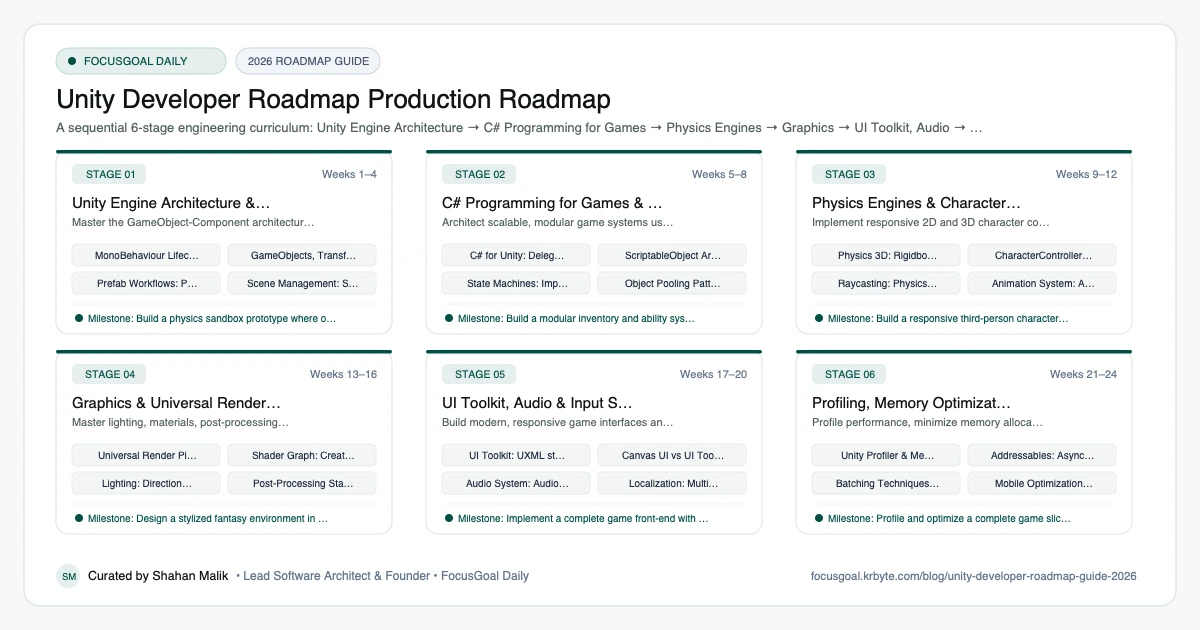
The 6 Production Stages
Follow these structured, sequential stages to systematically build production competence:
Unity Engine Architecture & Component Model
Master the GameObject-Component architecture, scene management, and MonoBehaviour lifecycles.
C# Programming for Games & ScriptableObjects
Architect scalable, modular game systems using modern C#, events, and ScriptableObject architecture.
Physics Engines & Character Controllers
Implement responsive 2D and 3D character controllers, collision detection, and raycast interactions.
Graphics & Universal Render Pipeline (URP)
Master lighting, materials, post-processing, and custom visual effects with Shader Graph and VFX Graph.
UI Toolkit, Audio & Input System
Build modern, responsive game interfaces and dynamic soundscapes using UI Toolkit and Unity Audio.
Profiling, Memory Optimization & Publishing
Profile performance, minimize memory allocations, and export release builds for PC, mobile, and consoles.
Is Unity Development Worth It in 2026?
Unity remains one of the most widely used game engines, especially for mobile, indie, and cross-platform games, as well as interactive simulations and some AR and VR work. That breadth means Unity skills can open doors beyond games, including training tools and visualization.
The caveat is that the game industry is competitive, and engine pricing and policies have changed in the past, so follow official announcements and licensing terms. Check current job listings in your region to see how much demand exists for Unity and C# developers.
- Good fit if you like C# and building interactive products.
- Mobile and indie markets are strong use cases.
- Non-game uses include simulation, training, and visualization.
Unity vs Unreal vs Godot: Which to Learn First
Unity uses C#, has a large asset ecosystem, and is a common choice for mobile and indie games. Unreal is stronger for cutting-edge 3D visuals and uses C++ plus Blueprints, as outlined in the Unreal Engine Developer roadmap. Godot is lightweight and open source, as covered in the Godot Developer roadmap.
If you want broad job options and already know or want to learn C#, Unity is a sensible first engine. Remember that the underlying concepts, such as game loops, physics, and architecture, transfer if you switch later.
- Unity: C#, mobile, cross-platform, large ecosystem.
- Unreal: high-fidelity 3D, C++ and Blueprints.
- Godot: lightweight, open source, fast prototyping.
Unity Setup: Tools You Need
Install Unity Hub, then a long-term support editor version and the build modules for your target platform. Use Visual Studio, Visual Studio Code, or JetBrains Rider as your C# editor, and set up Git with an appropriate Unity .gitignore.
Learn the Package Manager, the Profiler, and the Input System early, since they come up in real projects. For art and audio, free tools like Blender, Krita, and Audacity are enough to begin.
- Unity Hub and an LTS editor release.
- A C# IDE and Git with a Unity .gitignore.
- Profiler for performance investigation.
- Blender and Krita for assets.
Unity Portfolio Projects & How to Get a Job
Show finished, playable work. Publish a build to itch.io or a mobile store, link your repository, and include a short video. Recruiters care about clean code, sensible architecture, and performance awareness, so mention how you profiled and optimized.
In interviews expect C# questions, the MonoBehaviour lifecycle, object pooling, and basic maths such as vectors. Prepare a short walkthrough of one project, including a problem you debugged and what you learned from it.
- A polished mobile game with touch controls, menus, and saved progress.
- A 3D third-person prototype with animation and camera control.
- A project using ScriptableObjects for data-driven design.
- A performance case study with Profiler screenshots.
Beginner Pitfalls vs Production Reality
Self-taught developers commonly waste months making avoidable structural mistakes. Here is how production engineers approach these challenges:
Master Unity Game Engineering with FocusGoal Daily
Unity game development requires combining creative design with rigorous software engineering. FocusGoal Daily structures this massive discipline into achievable daily micro-actions.
- Structured curriculum from C# and ScriptableObjects to URP, shaders, and profiling.
- 100% offline study support powered by local SQLite database on Android.
- In-app Ask AI tutor to clarify C# syntax, physics calculations, and URP shaders.
- Daily streak tracking to maintain disciplined study habits.
Track this roadmap,
one topic at a time.
Download FocusGoal, pick this roadmap and finish your first daily topic in minutes.
Frequently Asked Questions
Is Unity still a good choice after the pricing controversies?
Yes. Unity cancelled the runtime fee under new leadership, reaffirming standard seat-based licensing. With Unity 6, it remains the leading multiplatform engine for mobile, VR, and indie games.
What programming language does Unity use?
Unity uses modern C#. Unity supports modern C# features with the .NET Standard profile, providing strong type safety and high performance.
Can I learn Unity if I have no prior programming experience?
Yes. Unity's visual editor makes learning C# much more tangible than building text-based console programs, as you immediately see the visual results of your code.
Is Unity good for beginners?
Yes. It has extensive documentation, tutorials, and a large community, and C# is a good first language for game programming.
Do I need to know C# before learning Unity?
Basic C# helps, but you can learn the language while building small projects. Focus on variables, classes, and the Unity lifecycle.
Unity or Unreal Engine: which should I learn first?
Choose Unity for mobile, indie, and C# workflows, and Unreal for high-end 3D and C++ pipelines. Check job listings in your region to decide.
Can I make money with Unity?
Many developers publish games or work on commercial projects, but income varies widely. Read the current licence terms and consider freelance or studio roles.
How long does it take to learn Unity?
You can build simple games within weeks of steady practice, while professional-level skill takes much longer. Shipping several small projects is the fastest way to improve.
How does FocusGoal Daily help Unity game developers?
FocusGoal Daily organizes the vast Unity engine documentation into structured daily learning checklists with offline access on Android.
Start Your Unity Developer Roadmap Today
Follow structured daily goals, study 100% offline with local SQLite, and get on-demand AI guidance with FocusGoal Daily on Android.
Get FocusGoal Daily Free on Google Play