Godot Developer Roadmap (2026): GDScript, 2D/3D Physics & Indie Publishing Guide
Master open-source game development with Godot 4.3+, GDScript 2.0 static typing, scene tree composition, 2D/3D physics engines, visual shaders, and multiplatform game release.

What's in this guide
The Short Answer: Godot in 2026
Godot 4 has surged in popularity to become the undisputed champion of independent and 2D/3D open-source game development. With zero licensing fees, lightning-fast engine startup, and an elegant node-and-scene architecture, Godot enables solo developers and small studios to ship polished games quickly.
The key to mastering Godot is embracing its composition philosophy: everything is a Node, scenes can be nested inside other scenes, and communication flows down through method calls and up through Signals.
Just getting started? Read how to become a game developer and which engine to pick for the beginner-first plan.
Call down, signal up. Structure your game scenes modularly with signals and typed GDScript to prevent spaghetti code and build scalable indie games.
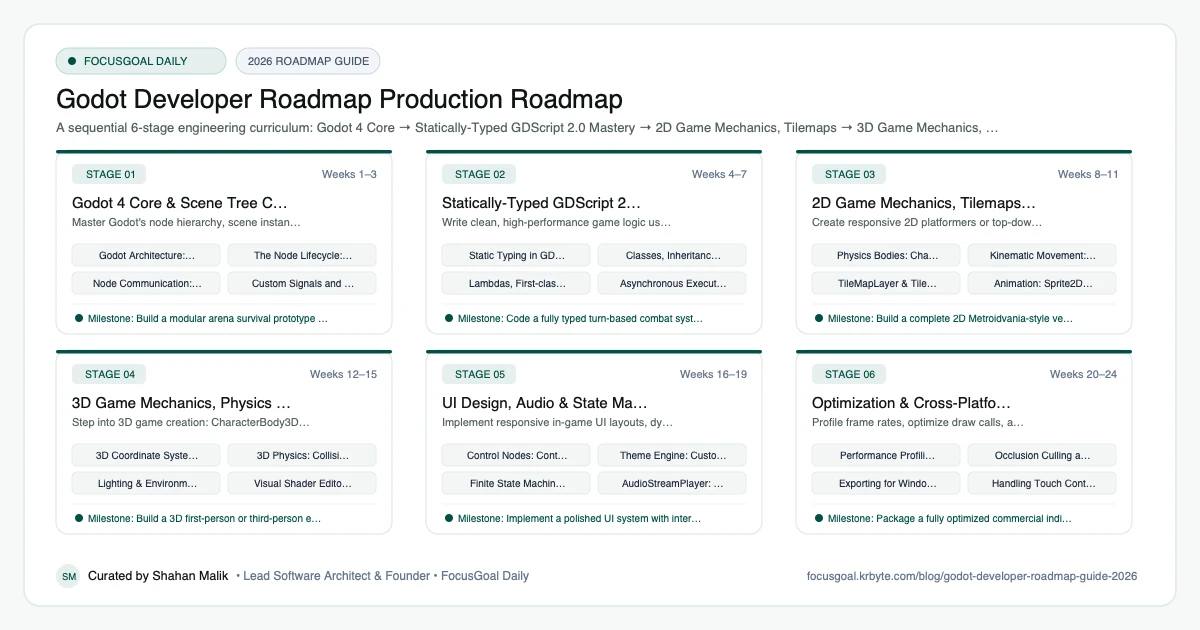
The 6 Production Stages
Follow these structured, sequential stages to systematically build production competence:
Godot 4 Core & Scene Tree Composition
Master Godot's node hierarchy, scene instancing, and engine execution lifecycle.
Statically-Typed GDScript 2.0 Mastery
Write clean, high-performance game logic using GDScript's modern static typing, lambdas, and class structures.
2D Game Mechanics, Tilemaps & Animation
Create responsive 2D platformers or top-down games with CharacterBody2D, TileMapLayer, and AnimationTree.
3D Game Mechanics, Physics & Shaders
Step into 3D game creation: CharacterBody3D, lighting, materials, and custom visual shaders.
UI Design, Audio & State Machines
Implement responsive in-game UI layouts, dynamic audio effects, and finite state machines.
Optimization & Cross-Platform Publishing
Profile frame rates, optimize draw calls, and export release builds for PC, mobile, and web.
Is Godot Worth Learning in 2026?
Yes, particularly for indie, 2D, and small-team projects. Godot is open source, lightweight, and free of royalties under its permissive licence, which makes it attractive to solo developers and learners. Its node-and-scene approach is easy to grasp, and GDScript is friendly to beginners.
The honest caveat is that there are fewer studio jobs listing Godot than Unity or Unreal, so it suits indie development, game jams, and freelance work better than corporate hiring. Always check current job listings before deciding.
- Good fit if you want to ship small games quickly.
- Strong 2D tooling; 3D has improved but check current capabilities.
- Open source means you can inspect and modify the engine.
Godot vs Unity vs Unreal: Which to Learn First
Godot is lightweight and ideal for learning core game development concepts quickly. Unity is a general-purpose engine with a large ecosystem and many mobile and indie jobs, covered in the Unity Developer roadmap. Unreal focuses on high-fidelity 3D and uses C++ and Blueprints; see the Unreal Engine Developer roadmap.
Game programming concepts such as game loops, scenes, input, physics, and state machines transfer between all three. If your goal is employment at a larger studio, check which engine they use; if your goal is making your own game, Godot is a very practical start.
- Godot: small footprint, fast iteration, great for 2D.
- Unity: broad ecosystem, mobile and cross-platform.
- Unreal: high-end 3D and C++ pipelines.
Godot Setup: Tools You Need
Download the engine from the official Godot site; it is a small download that runs without a complicated installer. Choose the standard version for GDScript, or the .NET version if you prefer C#. Install Git and use it from the first day.
Add an image editor such as Krita or Aseprite, an audio tool like Audacity, and a tile or level editor if needed. Free asset packs are useful for prototypes, but check their licences before you ship anything.
- Godot editor (standard or .NET build).
- Git for version control of scenes and scripts.
- Krita, Aseprite, or similar for art.
- Audacity or similar for sound.
Godot Portfolio Projects & How to Get a Job
Finish small games rather than starting large ones. A playable, polished jam entry shows more skill than an unfinished open-world prototype. Publish builds on itch.io, keep a clean source repository, and record a short gameplay clip for each project.
In your portfolio describe your role, the engine features you used, and what you would improve. Game jams are a good way to build teamwork evidence and practice finishing on a deadline, and the results are easy to share with recruiters.
- A complete 2D platformer with menus, saving, and sound.
- A top-down action game with enemy AI using state machines.
- A puzzle game with level progression.
- A game-jam entry published on itch.io.
Beginner Pitfalls vs Production Reality
Self-taught developers commonly waste months making avoidable structural mistakes. Here is how production engineers approach these challenges:
Master Godot Game Development with FocusGoal Daily
Shipping an indie game requires mastering programming, game design, and creative iteration. FocusGoal Daily breaks this vast craft into focused daily micro-goals.
- Structured curriculum covering GDScript, 2D/3D physics, shaders, and game architecture.
- 100% offline study support powered by local SQLite database on Android.
- In-app Ask AI tutor to clarify GDScript syntax, vector mathematics, and scene setups.
- Daily streak tracking to keep you committed until your first game ships.
Track this roadmap,
one topic at a time.
Download FocusGoal, pick this roadmap and finish your first daily topic in minutes.
Frequently Asked Questions
Why is Godot gaining so much popularity compared to Unity?
Godot is 100% free and open-source (MIT license) with zero revenue cuts or runtime fees. It is lightweight (~100MB download), boots instantly, and excels at 2D and stylized 3D indie games.
Should I use GDScript or C# in Godot 4?
GDScript is designed specifically for Godot, offers the fastest iteration speed, and has the richest community documentation. C# is excellent if you already know .NET or need heavy raw numerical processing.
Can Godot make commercial games for Steam and Mobile?
Yes. Many successful commercial games (Brotato, Dome Keeper, Cassette Beasts) were built and published with Godot across Steam, Nintendo Switch, and mobile app stores.
Is Godot good for beginners?
Yes. Its scene and node system is easy to understand, and GDScript reads similarly to Python, which helps new programmers.
Godot vs Unity: which is better for a beginner?
Godot is lighter and faster to start with, while Unity has a larger ecosystem and more job listings. Concepts transfer, so either is a fine first engine.
Can I make 3D games in Godot?
Yes, Godot supports 3D, and it has improved significantly in recent versions. For very high-end visuals, many teams still choose Unreal or Unity.
Do I need to know programming to use Godot?
Basic programming helps a lot, and GDScript is a gentle way to learn. You can learn the language and the engine together.
Can I get a job with Godot skills?
Godot jobs exist but are fewer than Unity or Unreal roles, so most Godot developers work on indie projects, freelance, or small studios. The general game-development skills you learn remain portable.
How does FocusGoal Daily help indie game developers?
FocusGoal Daily turns the game development journey into manageable daily milestones with offline progress tracking on Android.
Start Your Godot Developer Roadmap Today
Follow structured daily goals, study 100% offline with local SQLite, and get on-demand AI guidance with FocusGoal Daily on Android.
Get FocusGoal Daily Free on Google Play